
AI Image Models Showdown: Nano Banana 2 Lite vs FLUX.2 Pro vs GPT Image 1.5 vs Grok Imagine ( Quality, Cost, and Real-World Value)
August 26, 2026If you have only ever generated images inside an AI assistant, like asking ChatGPT or Gemini or Claude to whip something up for you, you have probably never actually chosen a model. Most of these chat based tools have an image generator built in, but they don’t let you pick which one, and half the time they won’t even tell you what’s running under the hood.
But by stepping outside the chat window, you will see a completely different world. Platforms like Leonardo AI, Civitai, and a bunch of others let you pick from literally hundreds of models before you even type a prompt.
Be it photorealistic, or cinematic, or product shot ready, or straight up illustrative, there is a model tuned for that, and you get to choose it yourself instead of hoping the AI guesses right. Once you start exploring this side of things, you realize every model has its own personality, its own strengths, and its own quirks.
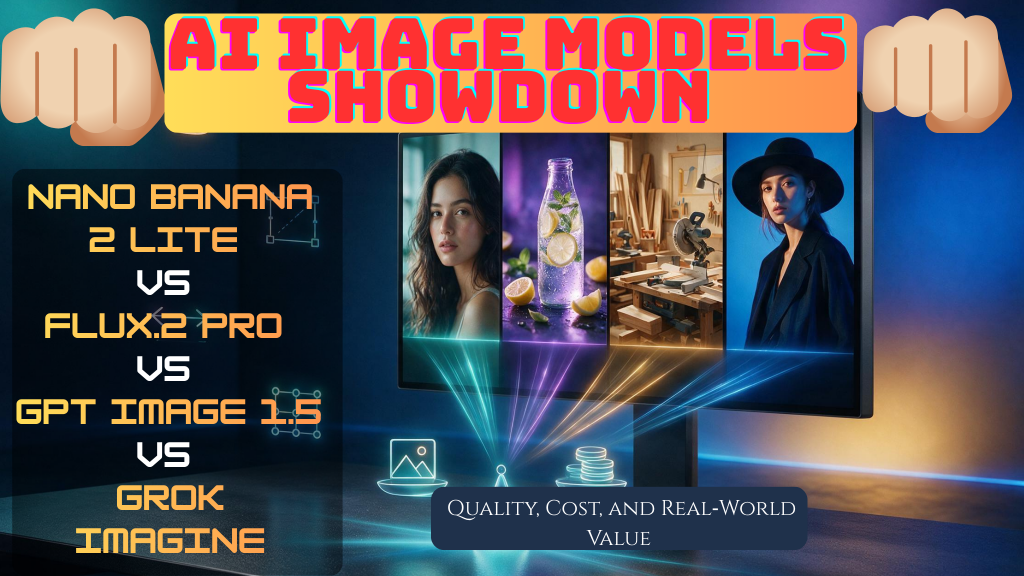
So that’s what today’s post is about. We took the 4 most used AI image models and ran them through the same test, side by side, across 5 different categories, to see how they actually perform. No hype, no cherry picked examples, just a real look at what each one does well and where it falls short.
Before the category tests, we set out:
- Which models are tested and why they matter
- The exact prompt and generation settings used
- How we evaluate quality in each category
- How we measure and compare cost across platforms
- How to read the verdicts and apply them to your own workflow
Models tested
- Nano Banana 2 Lite: Google’s low-cost, fast image model, aimed at high-volume, social-first workflows.
- FLUX.2 Pro: Black Forest Labs’ high-end photorealism model, strong on materials, lighting, and fine detail.–
- GPT Image 1.5 (medium) : OpenAI’s image model at medium quality, known for strong prompt adherence and text rendering.
- Grok Imagine: xAI’s image generator, positioned as a low-cost option for rapid iteration and social content.
Prompt and generation settings
Prompt: A single, locked prompt is used for all four models in each category. The prompt describes the scene, subject, style, lighting, and any required details, and is not altered between models.
Task type: Mostly text to image generation. For categories that needed it, like matching a specific pose, style transfer, or preserving a subject’s likeness, the same reference image was also fed into all four models for a fair comparison.
Output size: All models are set to a comparable 1K / ~1MP resolution for the test.
Quality setting: Each model uses its standard or medium quality preset, as appropriate for a fair real world comparison.
The exact prompt for each category is shown in that category’s section.
How we evaluate quality
- Prompt adherence: Does the image match the requested subject, style, lighting, and details?
- Visual realism: Are materials, lighting, shadows, and geometry believable and consistent?
- Detail and texture: Are surfaces, edges, and fine details clean and natural, without obvious artefacts?
- Category-specific factors: For example, glass reflections and metal highlights for product scenes, or skin texture and facial symmetry for portraits.
How we measure and compare cost
Because different websites and apps charge differently for the same model, we do not rely on a single platform’s token or credit count. Instead, we use a transparent, cross-platform method.
Price data and sources
- Price sources: Approximate per-image costs collected from around ten public platforms and API aggregators per model in 2026, including provider pricing pages and independent API-pricing comparisons.
- Output basis: All prices are normalised to a comparable 1K / ~1MP text-to-image output. Editing, upscaling, higher resolutions, or premium quality tiers can cost more.
Cross-platform cost summary
| Model | Avg price | Median price | Lowest listed | Highest listed | Typical use case |
|---|---|---|---|---|---|
| Grok Imagine (standard 1K) | ~$0.028 | ~$0.024 | ~$0.018 | ~$0.05 | High-volume social, drafts, iterations |
| FLUX.2 Pro (~1MP) | ~$0.042 | ~$0.043 | ~$0.025 | ~$0.06 | Product visuals, hero images, client work |
| Nano Banana 2 Lite (1K) | ~$0.033 | ~$0.037 | ~$0.013 | ~$0.055 | Fast, cheap generations where extreme realism is not critical |
| GPT Image 1.5 (medium ~1MP) | ~$0.032 | ~$0.034 | ~$0.005 | ~$0.05 | Strong prompt adherence and text rendering at medium quality |
These figures are averages across about ten representative platforms per model, not the price on any single website. Your actual cost can be lower or higher depending on the platform, plan, output size, and quality setting.
How cost is used in the verdict
- Token/credit numbers in the article: When we mention “~30 tokens” or “~200 tokens”, those figures reflect the specific platform used for our hands-on test. They are included for transparency but are not used to rank models by cost.
- Cost ranking: The labels “cheapest” and “most expensive” are based on the average cross-platform price shown above.
- Value judgement: We separate best quality from best value. A model can win on quality but lose on value if its extra quality is only marginal while its cost is much higher.
How to read the verdicts
- Best quality: The model you should choose when the category’s main criterion matters most (for example, client work, product pages, or large hero images).
- Best value: The model that gives you the most usable result for the average cost, ideal for high-volume posts, drafts, and low-stakes creative.
- Where the winning model excels
- What trade-offs the value model makes
- When it is worth paying extra and when the cheaper option is good enough
How we measured cost and value
This article compares four AI image models: Nano Banana 2 Lite, FLUX.2 Pro, GPT Image 1.5 (medium), and Grok Imagine, on both output quality and real-world cost. Because different websites and apps charge differently for the same model, we do not rely on a single platform’s token or credit count. Instead, we use a transparent, cross-platform method.
Models and output basis
- Models tested: Nano Banana 2 Lite, FLUX.2 Pro, GPT Image 1.5 (medium), Grok Imagine.
- Task type: Text-to-image generation (no reference image), matching the prompt used in our hands-on test.
- Output normalisation: All prices below are approximate USD per generated image at a comparable 1K / ~1MP resolution. Editing, upscaling, higher resolutions, or premium quality tiers can cost more.
Where the price data comes from
- Price sources: Approximate per-image costs collected from around ten public platforms and API aggregators per model in 2026, including provider pricing pages and independent API-pricing comparisons.
- What we extract: For each model we record the listed price for a standard 1K / ~1MP text-to-image generation, then compute an average, a median, and a typical low–high range across platforms.
1. Portrait / Headshot
- Skin realism : Real skin has pores, subtle unevenness, faint blemishes, and texture variation. AI models often default to smooth, waxy, “airbrushed” skin unless specifically told not to.
- Eyes and focus: In real photography, the eyes are always the sharpest point in a portrait. If the eyes look slightly off, glassy, or asymmetrical, it breaks the illusion instantly.
- Light direction and consistency: Shadows should fall logically from one light source. A common AI mistake is inconsistent lighting, like shadows on both sides of the face at once.
- Natural asymmetry: Real human faces are not perfectly symmetrical. Overly “perfect” faces are usually a giveaway that an image is AI-generated.
- Believable hair : Flyaway strands, natural part lines, and texture. Hair that looks like a solid “helmet” is a common failure point.
- Correct anatomy: Ears, teeth, and hands (if visible) are still common failure areas even in 2026 models.
What commonly goes wrong
- Overly smooth plastic doll skin
- Eyes that don’t quite look focused or aligned
- Backgrounds that are too sharp, competing with the subject
- Unnatural symmetry that makes the face look artificial
- Warping around the ears, jaw, or hairline when the pose is at an angle
Importance of writing the perfect prompt
A vague prompt like “portrait of a woman, natural lighting” hands all creative decisions to the model, meaning you can’t fairly compare four models because they are not solving the same problem.
A tightly controlled prompt can text the execution of the model, not its imagination. The more specific you are about lighting, lens, skin, and framing, the more control you have over the result and the easier it becomes to spot which model actually listens to instructions versus which one guesses.
The test prompt
A photorealistic portrait of a South Asian woman, around 35 years old, medium-brown skin tone, shoulder-length straight black hair tucked behind one ear, minimal makeup, wearing a plain olive-green cotton kurta with a round neckline. Neutral relaxed expression with a slight natural smile, head turned 10-15 degrees to the left, eyes looking directly at the camera. Head-and-shoulders framing, subject centered, occupying about 60% of frame height, shot at eye level. Soft natural window light from the left at a 45-degree angle, gentle shadow on the right side of the face, no harsh shadows. Background is a plain, out-of-focus neutral gray-beige wall with no texture or objects. Simulated 85mm portrait lens at f/2.0, shallow depth of field, sharp focus on the eyes. Realistic skin texture with visible pores, no airbrushing, no plastic skin. Natural, slightly warm color tone, no cinematic color grading. High resolution, photorealistic, not illustration or 3D render.
What to evaluate in the results
| Factor | What to look for |
|---|---|
| Skin texture | Pores/imperfections vs. smoothed/plastic |
| Eye sharpness | In focus, aligned, natural catchlight |
| Lighting accuracy | Shadow direction matches the prompt |
| Background | Correctly blurred, no texture/objects |
| Prompt adherence | Did it follow kurta color, hair style, angle? |
| Overall believability | Would this pass as a real photo at a glance? |
Verdict
Image 1: Grok Imagine
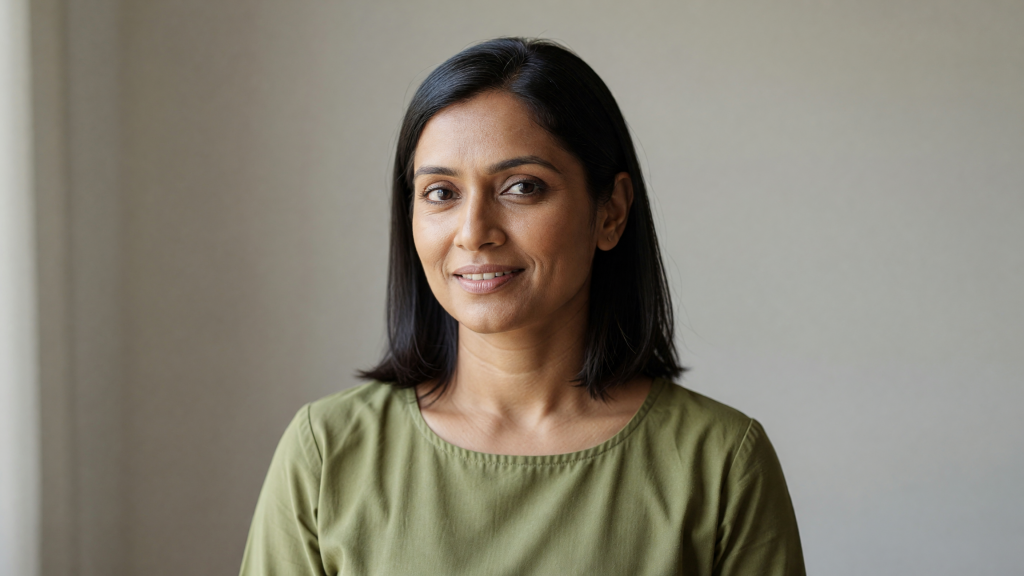
- Skin texture: Reasonably natural, some texture visible, not overly smoothed.
- Eyes: In focus but expression reads a bit more toothy smile than the neutral, slight smile as requested.
- Lighting: Fairly flat and even across the face, It doesn’t show the clear directional 45-degree shadow the prompt asked for.
- Background: Plain wall, but there’s a vertical pillar/edge in frame that wasn’t requested, and it’s not blurred/out-of-focus the way an 85mm f/2.0 shot would render it.
- Framing: This is the biggest miss, it’s a wide landscape shot with the subject occupying maybe 30-35% of the frame, arms and waist visible. The prompt called for head-and-shoulders at 60% of frame height, centred. This one ignored that instruction almost entirely.
- Believability: Passable as a photo, but doesn’t feel like a considered portrait as it feels more like a generic scene.
Image 2: FLUX 2 Pro
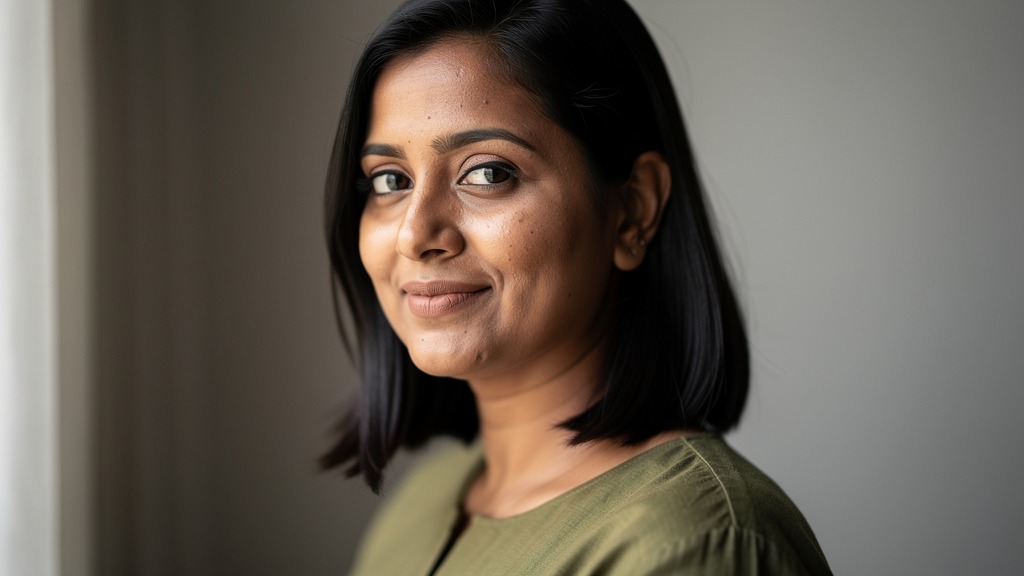
- Skin texture: Best of the four here. Covered visible pores, a natural mole, asymmetry, no plastic smoothing. This looks the most like real skin.
- Eyes: Sharp, well-focused, natural catch light.
- Lighting: More dramatic/moody than “soft natural window light” as it leans darker with more contrast than the prompt specified. Technically well-lit, but not quite matching the brief.
- Background: Darker vignette rather than the neutral gray-beige requested.
- Framing: Close, angled portrait, roughly matches head-and-shoulders intent, slight over-crop on one side.
- Believability: Very strong. Probably the most “could be a real photo” of the four, but it interpreted the lighting mood rather than following it precisely.
Image 3: Nano Banana 2 Lite
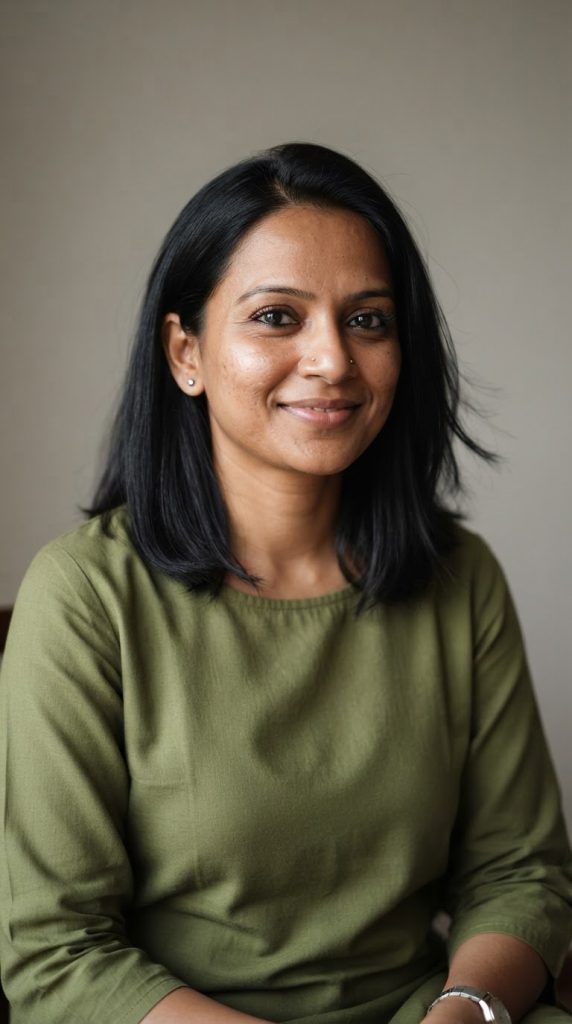
- Skin texture: Good, visible natural texture, not overly airbrushed.
- Eyes: Slightly softer focus than Image 2 or 4, still acceptable.
- Added details not in the prompt: Nose ring, wristwatch, hand in frame. The model added props that weren’t in the prompt.
- Lighting: Even, fairly flat, doesn’t show the strong directional shadow specified.
- Framing: Wider than requested, shows torso, lap and a hand, and not just tight head-and-shoulders.
- Believability: Reads as a real photo, casual and natural, but drifted from the brief more than Image 4.
Image 4: ChatGPT 1.5

- Skin texture: Strong. It includes visible pores, natural, no plastic smoothing.
- Eyes: Sharpest of the set, clear catchlight, well-focused.
- Lighting: Closest match to the brief. It has soft, directional, gentle shadow, believable as window light.
- Background: Correctly out-of-focus, neutral, no added objects.
- Wardrobe accuracy: The top reads more like a linen shirt with a button placket than a round-neck kurta, which might be a minor deviation but not for somewhere accuracy matters everything such as image for retail, ecommerce, and other product-based image generations.
- Framing: Closest to the requested head-and-shoulders, centered composition.
- Believability: Very high, and the most faithful to the actual prompt.
Comparison table
| Factor | Grok | FLUX 2 Pro | Nano Banana 2 Lite | ChatGPT 1.5 |
|---|---|---|---|---|
| Skin realism | Good | Best | Good | Very good |
| Eye & focus sharpness | Fair | Very good | Fair | Best |
| Lighting per brief | Poor match | Stylized, off-brief | Poor match | Best match |
| Background per brief | Poor match | Off-brief (darker) | Poor match | Best match |
| Framing per brief | Poor match | Fair | Poor match | Best match |
| Prompt adherence overall | Weak | Moderate | Moderate | Strong |
| Cost | 30 tokens | 200 tokens | 50 tokens | 150 tokens |
Does quality justify the cost?
- Grok Imagine: Cheapest by far, but also the weakest prompt adherence here. Mainly because it ignored the framing instructions almost entirely. For casual, low-stakes use it’s fine value, but for anything requiring precise control, it underperforms.
- FLUX 2 Pro: Most expensive, and the skin/eye realism is genuinely the best of the four. But it took creative liberties with lighting and background rather than following the brief. You are here paying a premium for aesthetic quality, not precision.
- Nano Banana 2 Lite: Solid mid-tier result for a low price, but it added unrequested elements (nose ring, watch, wider framing), suggesting looser prompt control at this tier.
- ChatGPT 1.5: Best overall balance. Highest prompt fidelity, strong realism, and it’s not the most expensive option. This is the standout value pick for anyone who wants control over composition and lighting, not just a nice-looking face.
Winner: ChatGPT 1.5
It’s not the cheapest, but it’s the only one that actually respected the detailed instructions including framing, lighting direction, and background, while still delivering strong skin and eye realism. FLUX 2 Pro produces a technically beautiful image, but at more than the cost, for a result that deviates further from the brief. For a comparison specifically testing prompt control, ChatGPT 1.5 wins this round.
Category 2: Face Swap & Face Consistency
This category tests something different from portrait generation. Now it’s not about generating a good-looking face from scratch, but checking whether the model can preserve someone’s actual identity across different scenes, poses, and lighting conditions.
This matters for real use cases including brand mascots, personal avatars, consistent characters in a social media campaign, or product model shots.
What makes a good AI face swap or face-consistent generation?
- Identity preservation: Same bone structure, same eye shape, colour, same nose, same mouth shape.
- Consistent distinguishing features: Moles, scars, specific eyebrow shape, ear shape should carry over.
- Natural integration into the new scene: Correct lighting on the face matching the new environment, correct head angle relative to the body, no obvious pasted-on look.
- Consistent age and skin tone: The swapped face shouldn’t look younger, older, lighter, or darker than the source.
- No warping or blending artefacts: Soft edges around the jawline or hairline where the face meets the rest of the image.
What commonly goes wrong
- The result looks like a different person who merely resembles the original (common failure models often average toward a generic attractive face
- Skin tone mismatch between the face, neck and body
- Lighting on the face doesn’t match the lighting in the new scene
- Expression inconsistency
- Hard edges or blur around the face boundary
Importance of a perfectly created prompt
Face consistency is one of the hardest things for these models to get right, because most text-to-image systems don’t have a persistent memory of a face unless the tool specifically supports image-to-image reference or face-lock features.
The test process
Step A: Reference image:
Use one real, consistent source photo across all four tools (not a different AI-generated image per tool). A plain, well-lit, front-facing photo works best as the reference.
We use the previous portrait generated by chatgpt as the reference image.
Step B: Prompt to place the same face in a new scene:
Using the uploaded photo as a reference, generate a new image of the exact same person — same face, same identity, same skin tone, same distinguishing features. Do not change their facial structure. Place them in a new scene: sitting at an outdoor café table, holding a white ceramic coffee cup, smiling naturally, daytime, soft natural sunlight, background softly blurred with hints of café chairs and greenery. Their clothing can be casual daywear appropriate for a café setting. Photorealistic, not illustrated.
What to evaluate in the results
| Factor | What to look for |
|---|---|
| Identity match | Same eyes, nose, mouth, face shape as reference |
| Distinguishing features retained | Moles, brows, ears consistent with source |
| Skin tone consistency | Matches reference, no lightening and darkening |
| Lighting integration | Face lighting matches the new outdoor scene |
| Edge & blend quality | No visible seams, warping, or paste-like edges |
| Scene accuracy | Café setting, coffee cup, natural daylight as described |
| Tool capability | Did the tool need a special feature, or handle it via plain prompting? |
Verdict
Image 1: Nano Banana 2 Lite
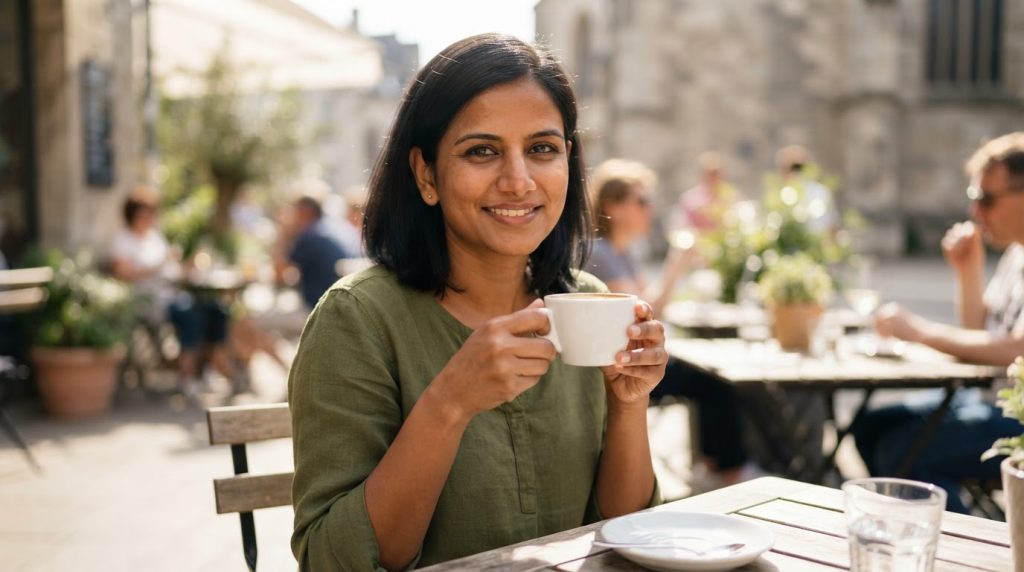
- Identity match: Strong. Eye shape, nose bridge, and mouth shape read consistent with the reference. Eyebrow shape and general face structure line up well.
- Skin tone: Consistent with the source, no lightening or darkening.
- Lighting integration: Good. The face reads as lit by the same warm outdoor sunlight as the rest of the scene, not pasted on.
- Scene accuracy: Outdoor café, holding a white cup, background people and greenery, matches the brief closely.
- Wardrobe: Kept the same olive top from the reference, which actually helps the illusion of continuity even though it wasn’t strictly required.
- Verdict: Convincing and well-integrated.
Image 2: Grok Imagine
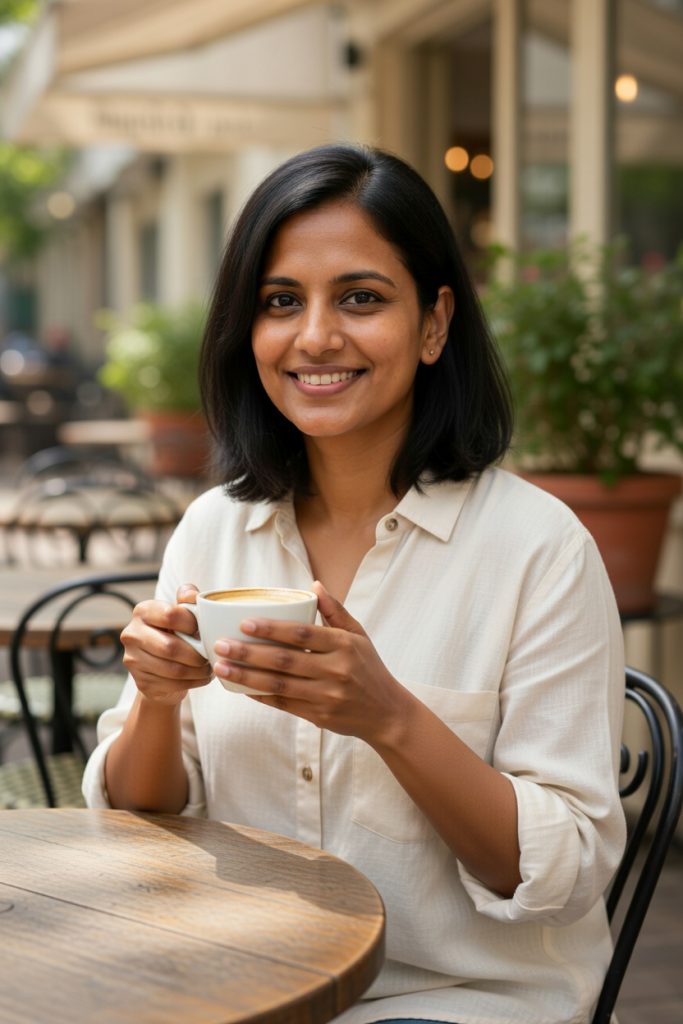
- Identity match: Weaker. The face is in the same general family (similar hair, skin tone) but the smile is much wider/toothier than the reference’s subtle expression, and the cheek/jaw fullness looks slightly different. It reads more like a “similar-looking person” than an exact match.
- Skin tone: Consistent.
- Lighting integration: Reasonable, soft indoor-outdoor café light, believable.
- Scene accuracy: Matches brief well with the café, cup, natural setting.
- Wardrobe: Changed to a cream button shirt. It is not an issue itself, but combined with the changed expression, it further departs from feeling like “the same person, different day.”
- Verdict: Plausible scene, least confident identity lock of the four.
Image 3: ChatGPT 1.5
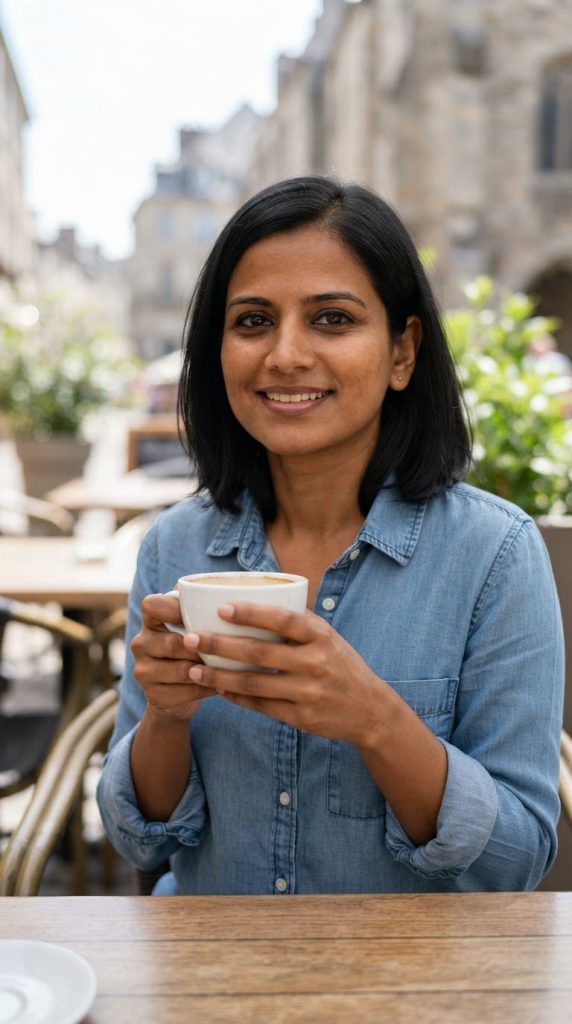
- Identity match: Strong. Eyes, brows, and nose shape are close to the reference. Expression is closer to the natural, moderate smile from the source rather than an exaggerated one.
- Skin tone: Consistent.
- Lighting integration: Well done with the natural daylight, soft shadow under chin, believable outdoor light.
- Scene accuracy: Matches the brief closely with the café table, cup, blurred street background.
- Wardrobe: Changed to a denim shirt, fine since only face identity matters.
- Verdict: One of the more faithful identity matches and the most naturally integrated lighting.
Image 4: FLUX 2 Pro
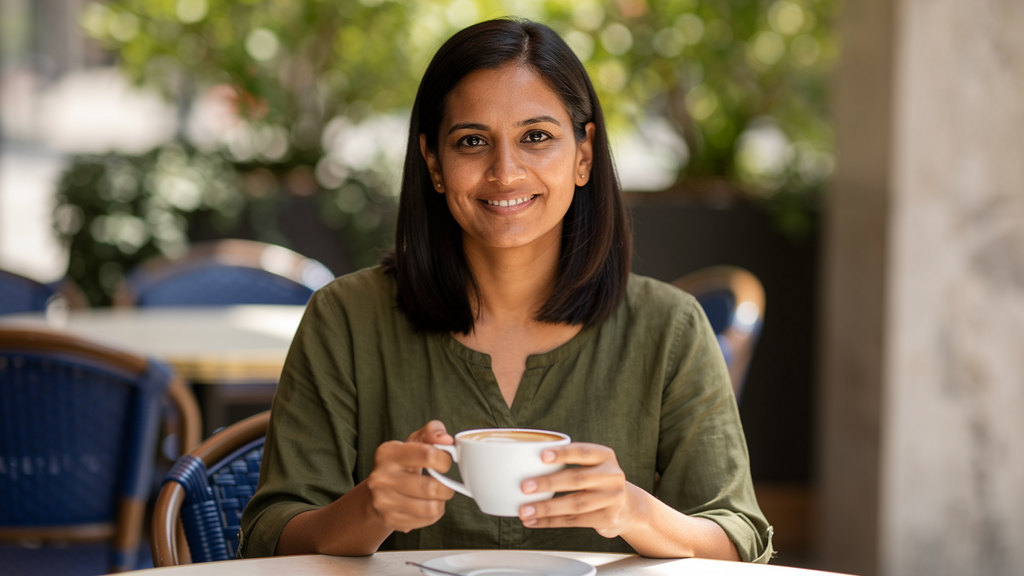
- Identity match: Strong, arguably the closest to the reference including the face shape, brow shape, and eye spacing look very aligned.
- Skin tone: Consistent.
- Lighting integration: Good, dappled outdoor light, natural highlights on skin.
- Scene accuracy: Matches the brief with café chairs, greenery, cup.
- Wardrobe: Kept the olive top like Image 1, reinforcing the visual continuity.
- Verdict: Best overall face fidelity, though this is the most expensive option.
Comparison table
| Factor | Nano Banana 2 Lite | Grok Imagine | ChatGPT 1.5 | FLUX 2 Pro |
|---|---|---|---|---|
| Identity/face match | Strong | Weaker | Strong | Strongest |
| Skin tone consistency | Good | Good | Good | Good |
| Lighting integration | Good | Fair | Very good | Very good |
| Scene & brief accuracy | Good | Good | Good | Good |
| Cost | 50 | 30 | 150 | 200 |
Does quality justify the cost?
- Grok Imagine: Cheapest, and the scene execution is fine, but this is the weakest identity match of the four. The expression shift makes it feel like a different person smiling similarly rather than the same person. For a face-consistency test specifically, this is a real shortfall.
- Nano Banana 2 Lite: The standout value pick here. For less than a third the cost of FLUX, it delivers identity fidelity that’s close to the top performers.
- ChatGPT 1.5: Solid, faithful result, but not clearly better than the 50-token option to justify triple the cost for this specific task.
- FLUX 2 Pro: Best face fidelity in the set, but the margin over Nano Banana 2 Lite is small relative to the 4x cost difference.
Winner: Nano Banana 2 Lite for price, Flux 2 pro for absolute accuracy
For face consistency specifically, this is the best value performer. It has strong identity retention, good lighting integration, and accurate scene-following, all at the lowest realistic cost among the three that actually nailed the identity match.
FLUX 2 Pro is marginally more faithful, but the price gap is hard to justify unless identity fidelity needs to be pixel-perfect. Grok Imagine, while cheapest, falls short on the core test of this category.
Important: Both flux 2 pro and nano banana 2 lite are perfect at capturing the identity of the source image in relation with the prompt. While I didn’t mention anything about outfit in the prompt itself, they took it as a part of identity. While other two take creative liberty to regenerate a different outfit.
While I won’t call it a flaw from their part as I didn’t mention it explicitly in the prompt, it shows how each model assumes a person identity when you say “same person, new scene”. Both flux and nano banana assumed continuity. For them, it means the same person taking another picture on the same day. Meanwhile, other models assume it as a new day, and a new location, which means an outfit change.
Now, this is something you need to take care while writing a prompt. I missed it to add in the prompt, you shouldn’t.
Category 3: Upscaling
Upscaling takes a low-resolution or soft or blurry image and increases its resolution while adding believable detail. This is different from the first two categories because the model isn’t creating something from a text description. Here, it has to follow the reference image as closely as possible, and that’s an entirely different challenge
What makes a good AI upscaler?
- Real detail recovery: Texture in skin, fabric, wood grain, etc. should look like a sharper version of what was already there.
- No identity or content drift: If there’s a person or object in the photo, they should still look like the same person/object, just clearer.
- Edge and texture sharpness: Fine lines, text, and fabric weave should become crisper, not smeared or waxy.
- No new artefacts: Some upscaletools introduce odd patterns, warping, or an over sharpened “HDR” look that doesn’t match a real photo.
- Preserved colour accuracy: Colours shouldn’t shift or oversaturate during the process.
- Believable noise/grain handling: Real photos have natural noise, and a good upscaler cleans noise without wiping out texture entirely.
What commonly goes wrong?
- Skin turning waxy or “plastic” because the model smooth out real texture instead of enhancing it
- Faces subtly changing shape or features when the model “reimagines” details it isn’t sure about
- Fabric and background textures turning into a blurry mush or, conversely, an artificial-looking sharpened pattern
- Oversaturated colours that weren’t in the original
- Fine details like jewellery, embroidery, or small text becoming distorted rather than clarified
Why the source image and prompt matter here
Unlike the earlier categories, this test isn’t really about a creative text prompt. The goal here is to check how the model treats an image. The fairest test uses the exact same low-resolution source image across all four tools, with the same simple upscale instruction, so the comparison isolates the upscaling engine itself rather than differences in interpretation.
The test process
Source image: Use one real (not AI-generated) low-resolution or slightly blurry photo.
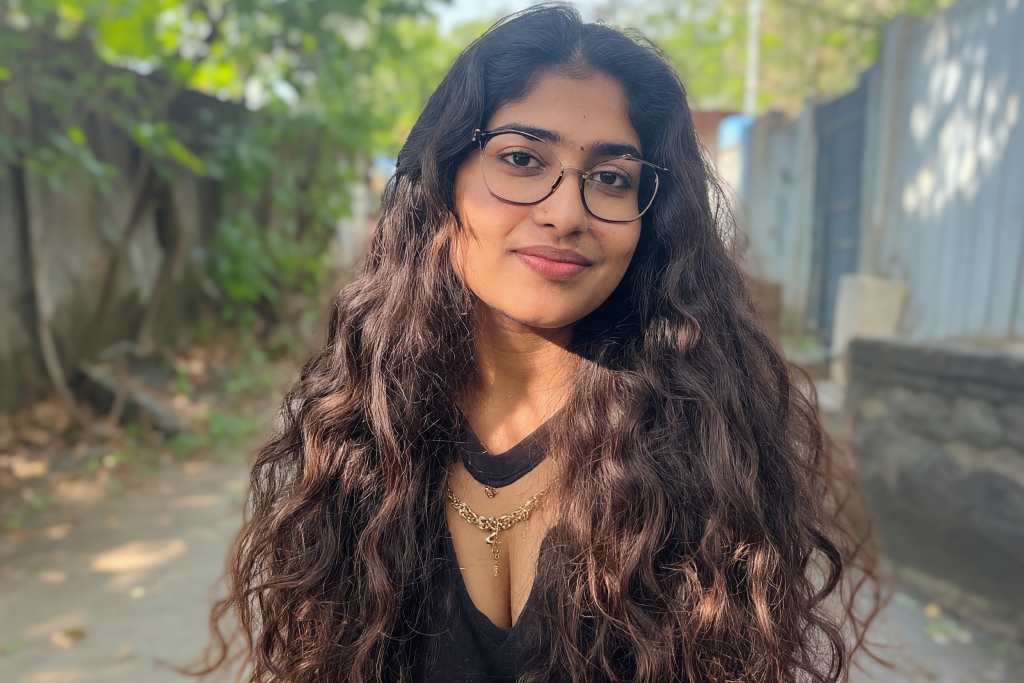
Prompt to use with each tool :
Upscale this image to a higher resolution while preserving the original details, faces, colors, and textures exactly as they are. Do not add, remove, or alter any content. Do not smooth out natural skin texture or fine detail. The result should look like a sharper, higher-resolution version of the same photo, not a reinterpretation.
What to evaluate in the results
| Factor | What to look for |
|---|---|
| Detail recovery | Genuine sharpness increase vs. artificial oversharpening |
| Identity and content fidelity | Same face/object, no reinterpretation |
| Texture handling | Skin, fabric, and surfaces look natural, not waxy or smeared |
| Artefacts | No warping, ghosting, or repeating patterns |
| Colour accuracy | No unwanted saturation or tone shift |
| Resolution gain | Actual measurable increase in clarity/size |
Verdict
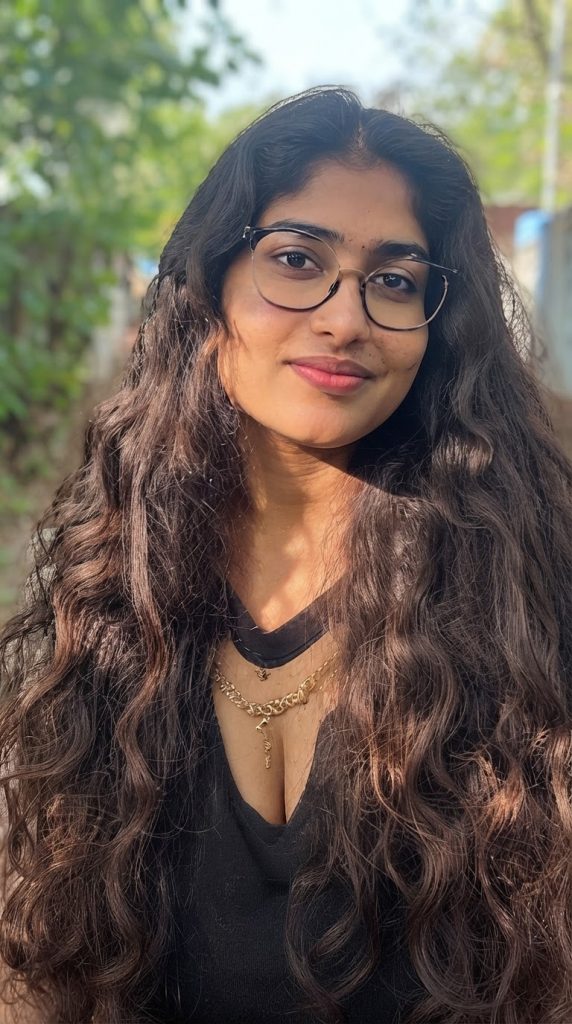
Image 1: FLUX 2 Pro
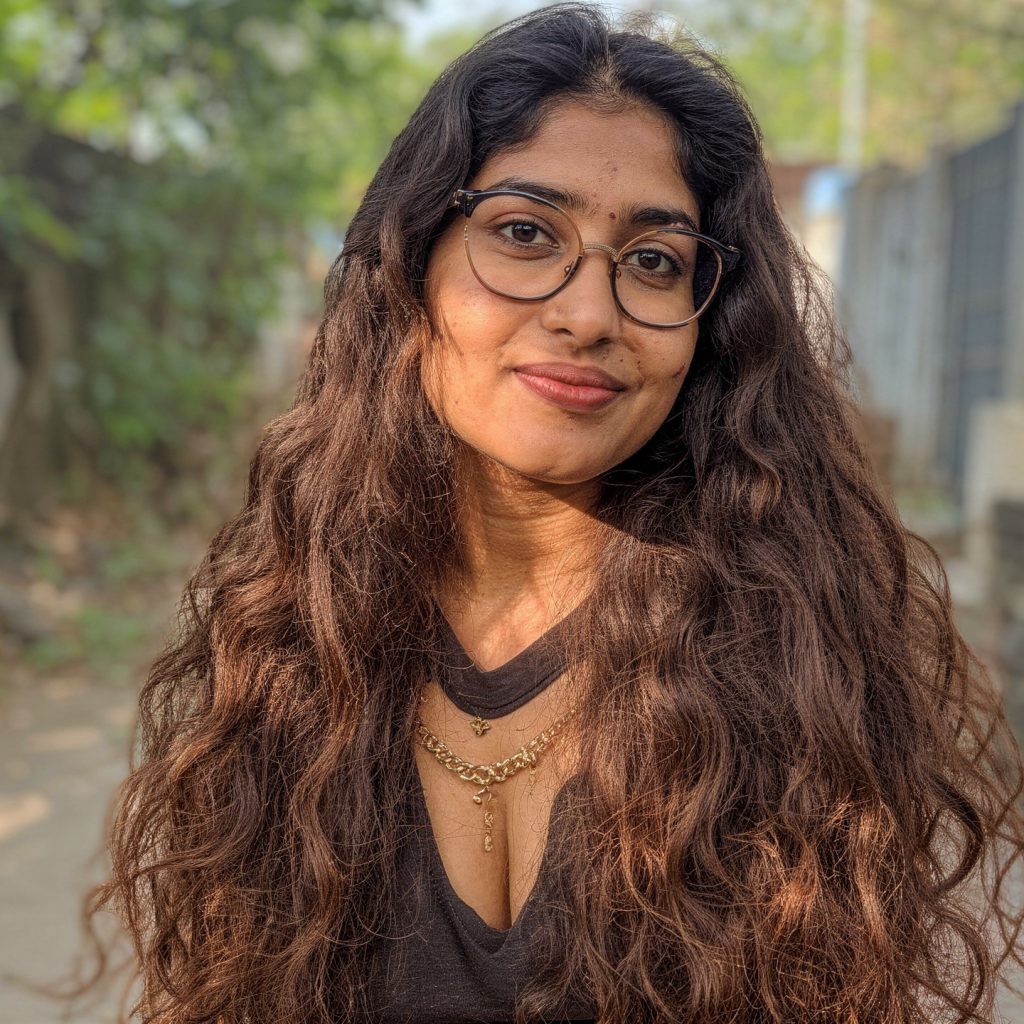
Detail recovery: Strong. Facial pores and hair strands are sharply rendered, but the added wrinkle detail appears overstated around the nose and across the neck.
Identity and content fidelity: Very good. Glasses, bindi, necklace, clothing, and facial identity remain consistent, although over-emphasised skin texture slightly changes the apparent age.
Texture handling: Fair. Hair and clothing retain natural texture, but the face and neck look overly wrinkled rather than naturally detailed.
Artefacts: Fair. Slight distortion is visible around the nose, where intensified wrinkle detail interrupts the otherwise clean facial structure.
Colour accuracy: Excellent. Warm sunlight, skin tone, clothing colour, and the outdoor setting remain natural and closely match the source.
Framing: Fair. The tighter crop reduces surrounding background context and makes the image feel like a closer portrait than the original standard-distance photograph.
Verdict: Excellent identity preservation and colour fidelity, but exaggerated facial and neck wrinkles, slight nose distortion, and a tighter crop make the transformation less natural than the source.
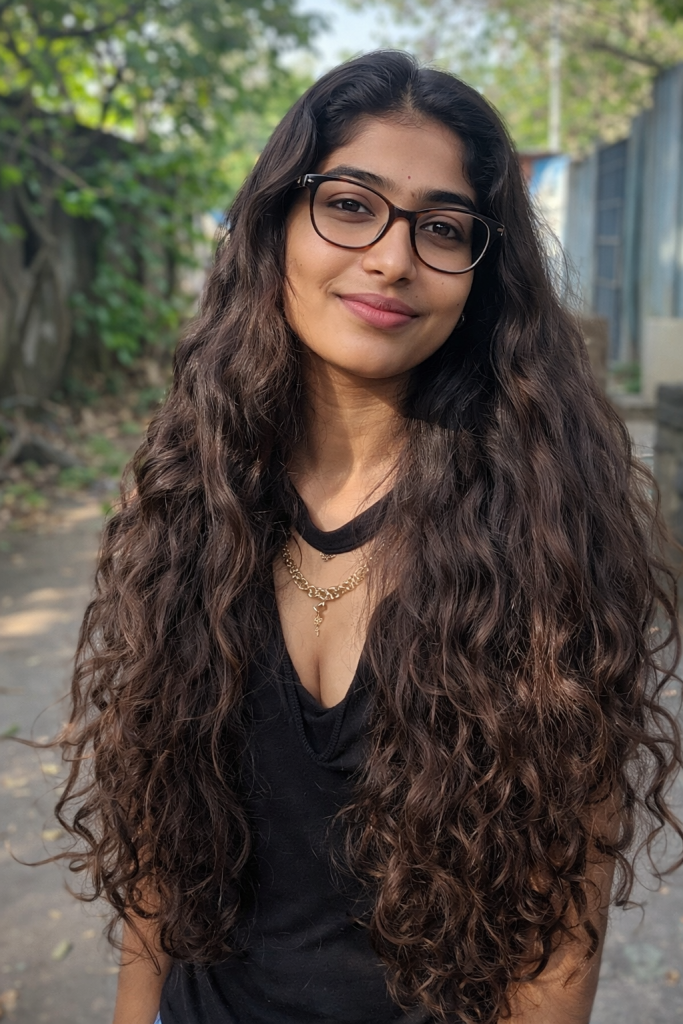
Image 2: Nano Banana 2 Lite
Compared with the source, the Nano Banana output does not simply upscale the original. It creates a taller portrait composition and adds substantial content below the original lower boundary, including more of the woman’s torso and clothing. That is a content and framing change, not faithful resolution enhancement.
Detail recovery: Good. Hair strands, glasses, facial features, and clothing texture are clearer, but the output also appears to generate additional detail in areas beyond the source frame rather than only recovering existing information.
Identity/content fidelity: Fair. The woman’s face, glasses, hair, necklace, bindi, and clothing remain recognisable, but extending the image below the original frame changes the supplied content.
Texture handling: Good. Hair texture and skin detail remain relatively natural without obvious waxy smoothing, although some newly generated lower-area detail cannot be verified against the source.
Artefacts: Fair. No major facial distortion is obvious, but the added lower section is synthetic expansion rather than a faithful upscale and should be treated as a content-generation deviation.
Colour accuracy: Good. The green clothing, warm skin tones, and outdoor lighting remain broadly consistent with the source, though the enlarged composition has a slightly softer, more diffuse appearance.
Framing: Poor. The output changes the original framing substantially by extending downward and producing a taller portrait instead of preserving the source image as-is.
Verdict: Nano Banana improves visible sharpness but fails the locked instruction by generating an extended lower composition; it is an image expansion, not a faithful upscale of the supplied source.
Image 3: Grok Imagine
- Detail recovery: Good overall sharpness, hair strands are less individually defined than Image 1, slightly more “clumped” look in places.
- Identity/content fidelity: Consistent facial features and accessories.
- Texture handling: Mostly natural, though a touch smoother on skin than the FLUX result.
- Artifacts: None major, but overall softness suggests less aggressive detail recovery for the price.
- Color accuracy: Natural, slightly desaturated compared to Image 1.
- Framing: Also reframed wider/taller than what appears to be the original. It has the same deviation issue as Image 2.
- Verdict: Decent, but least sharp of the four despite being the cheapest.
Image 4: ChatGPT 1.5
Detail recovery: Very weak. Created a different person.
Identity and content fidelity: Consistent, no distortion in face, glasses, or jewellery.
Texture handling: Natural, well-balanced, not over-sharpened.
Artefacts: None visible.
Colour accuracy: Slightly cooler/muted tone versus FLUX’s warmer rendering, but accurate to a natural daylight look.
Framing: Also a portrait recrop. Extended the body to the waist, which I never asked for in the prompt.
Verdict: chatpgt 1.5 fails on identity fidelity and framing compliance. Despite clean textures and no visible artefacts, it effectively generated a different person and altered the composition without being asked, making it unsuitable compared to a model that preserves the original subject and respects the prompt.
Comparison table
| Criteria | FLUX 2 Pro | Nano Banana 2 Lite | Grok Imagine | ChatGPT 1.5 |
|---|---|---|---|---|
| Detail recovery | Excellent, crisp hair strands, pores, freckles | Good, clear but slightly softer | Good, sharp overall, hair slightly clumped | Very weak, created a different person |
| Identity/content fidelity | Consistent, undistorted | Consistent, intact | Consistent | Consistent, no distortion |
| Texture handling | Natural, real curl texture | Natural, no waxy smoothing | Mostly natural, touch smoother | Natural, well balanced |
| Artefacts | None visible | None significant | None major | None visible |
| Colour accuracy | Warm, natural, believable | Slightly cooler/flatter | Natural, slightly desaturated | Slightly cooler/muted, but accurate |
| Framing | Matches intended square crop | Reframed to portrait, deviation | Reframed wider/taller, deviation | Reframed to portrait, deviation |
| Verdict | Very strong, faithful result | Solid, but reframing is a miss | Decent, least sharp of the four | Fails on identity fidelity and framing compliance |
Does quality justify the cost?
Grok Imagine (30 tokens): Cheapest, and the output is decent in isolation, but it is the softest of the four and still reframes the image. For basic, low-stakes use this is acceptable value, but not for anyone needing maximum detail recovery or strict prompt compliance.
Nano Banana 2 Lite (50 tokens): Good middle-ground value, solid detail for a low price, but it shares the reframing issue and extends the composition beyond the original frame. It is a decent budget option if you do not care about faithful framing.
ChatGPT 1.5 (150 tokens): Strong detail recovery in some areas, but it fails on identity fidelity by effectively creating a different person and also reframes the image. At this price, that is poor value for any use case where subject accuracy matters.
FLUX 2 Pro (200 tokens): Best overall fidelity and the only one that respected the original framing, but at the highest cost. Whether it is “worth” the premium depends on whether framing preservation and identity fidelity matter for your use case. For a task defined as faithful upscaling, it is the only model that truly meets the brief.
Winner: FLUX 2 Pro
It delivered the sharpest, most artefact-free detail recovery and was the only tool to actually honour the instruction to preserve the image as-is rather than recomposing it. It is the most expensive option, but for a category specifically about faithfulness to a source image, it earned the win on both technical quality and instruction-following. If cost is the deciding factor and framing does not matter, Nano Banana 2 Lite is a reasonable value alternative; ChatGPT 1.5 and Grok Imagine are not competitive here due to identity and framing failures.
Category 4: Photorealism (Non-Portrait Scene)
When it comes to photorealism, you must know that following a prompt word by word is not the core factor to judge a tool. Sometimes you might miss adding a small detail in the prompt or maybe you have no way of adding, but the model actually predicted that and fixes it for you.
In short, a genuinely strong photorealism model should behave less like a system executing instructions literally, and more like a photographer interpreting a brief.
What makes a good AI-generated photorealistic image?
- Does this look like a real, unedited photograph, or an AI image? This is the primary test.
- Did the model follow the prompt in ways that matter including the subject matter, composition, absence of banned elements like logos or text without either ignoring explicit instructions or blindly complying with instructions in a way that breaks physical realism?
What commonly goes wrong
- Treating descriptive words too literally instead of reasoning about what they physically imply (for example, rendering “chilled” as droplets alone, without the frosting a truly cold glass surface would show)
- Water, condensation, or other natural effects that look artificially “applied” rather than naturally formed
- Excess or implausible detail added for visual drama (unrealistic internal bubble density, for instance) that undercuts believability on close inspection
- Extra background objects or clutter the prompt explicitly asked to avoid
- Technical polish (lighting, background blur, texture detail) that’s strong on secondary elements while the main subject fails the realism test, which is the equivalent of a portrait with great bokeh and an unconvincing face
The test prompt
A photorealistic product photograph of a chilled clear glass bottle of sparkling water standing on a wet dark-stone countertop, covered in natural condensation droplets. A sliced lemon and a small sprig of mint sit beside the bottle. Soft daylight enters from the left through a nearby window, creating realistic reflections on the glass and faint shadows on the counter. Background is an out-of-focus modern kitchen in neutral tones, with no visible logos, labels, text, hands, or extra objects. The bottle is upright and centred, photographed at countertop level with natural perspective. Realistic glass transparency, refraction, water droplets, lemon pulp, mint-leaf texture, wet-stone reflections, and subtle natural colour. High resolution, photorealistic photograph, not illustration, 3D render, or stylised advertising art.
Verdict
Grok Imagine:
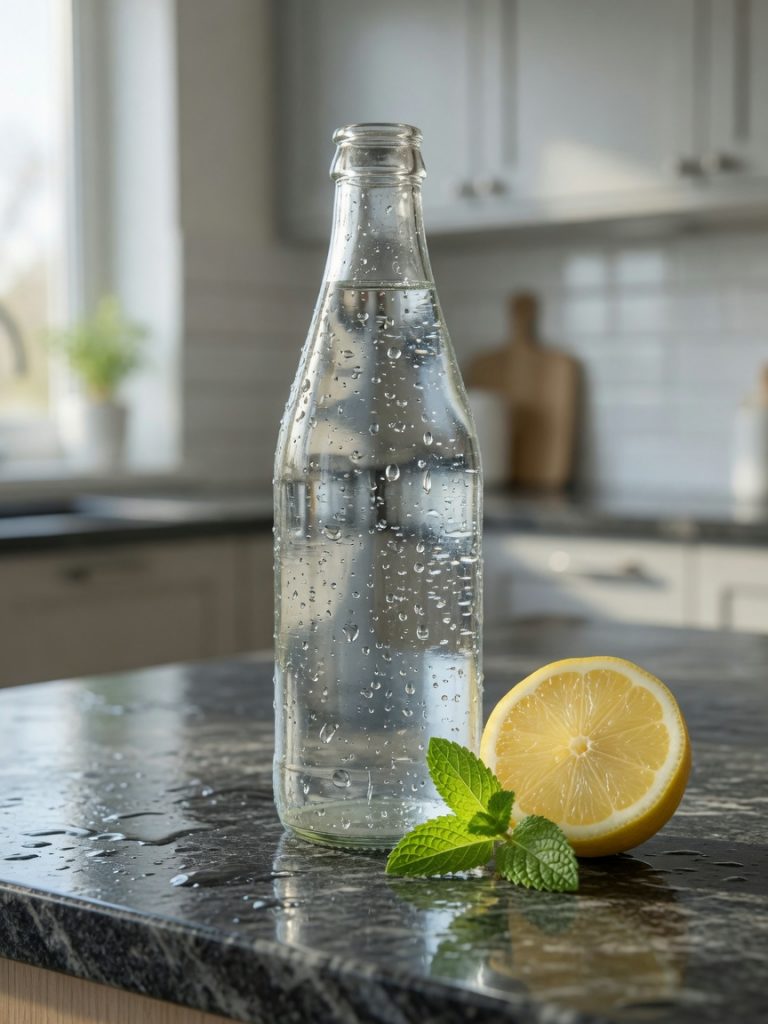
The water on the glass looks applied rather than condensed, more like the bottle was rinsed under a tap and shaken than one that’s been sweating from cold. There’s also a visible extra object in the background, breaking the “no extra objects” rule. Lighting is soft rather than clearly directional. Overall, the least convincing of the four.
ChatGPT 1.5:
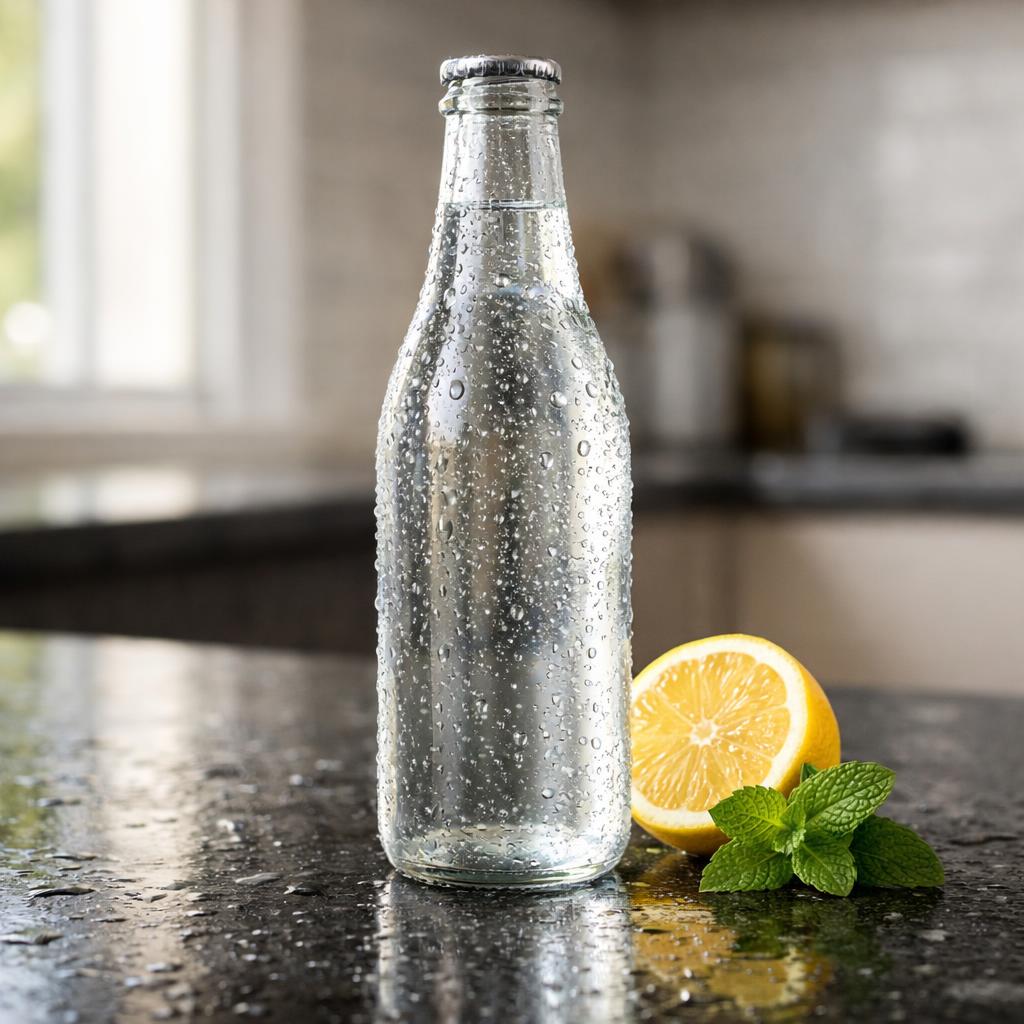
Shares the same “rinsed, not condensed” water problem as Grok, compounded by an unrealistic density of internal bubbles that doesn’t hold up as physically plausible. A cap is visible that wasn’t specified in the prompt. Clean and commercial-looking at a glance, but falls apart on closer inspection.
FLUX 2 Pro:
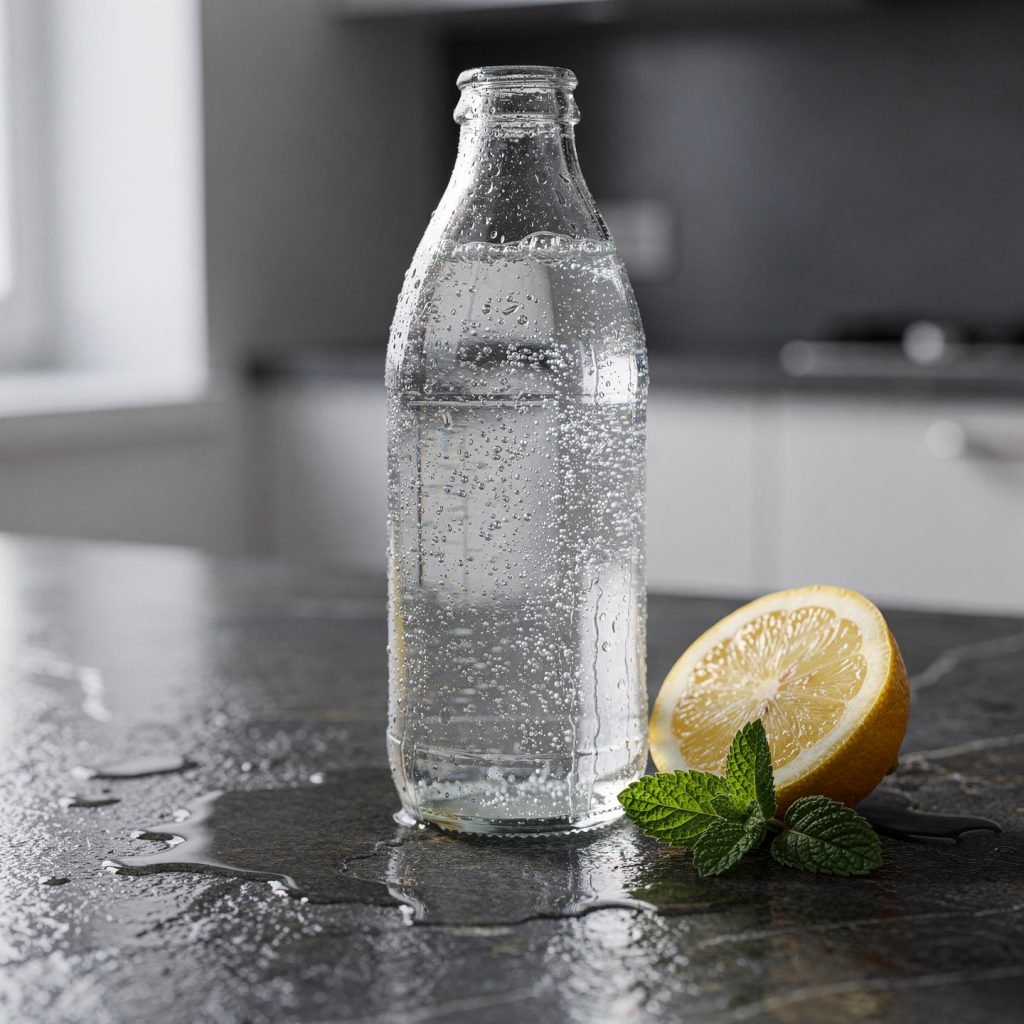
The strongest technical execution: best lighting coherence, sharpest stone texture, cleanest background blur, and the most precise prompt compliance on secondary details (no extra objects, no logos, correct framing). But the core subject — the chilled bottle — under-delivers. The frosting effect is so subtle it requires close inspection to notice, and the water pooling around the base reads more like spilled water than natural condensation runoff. Strong polish, weaker on the one thing the prompt was actually about.
Nano Banana 2 Lite:
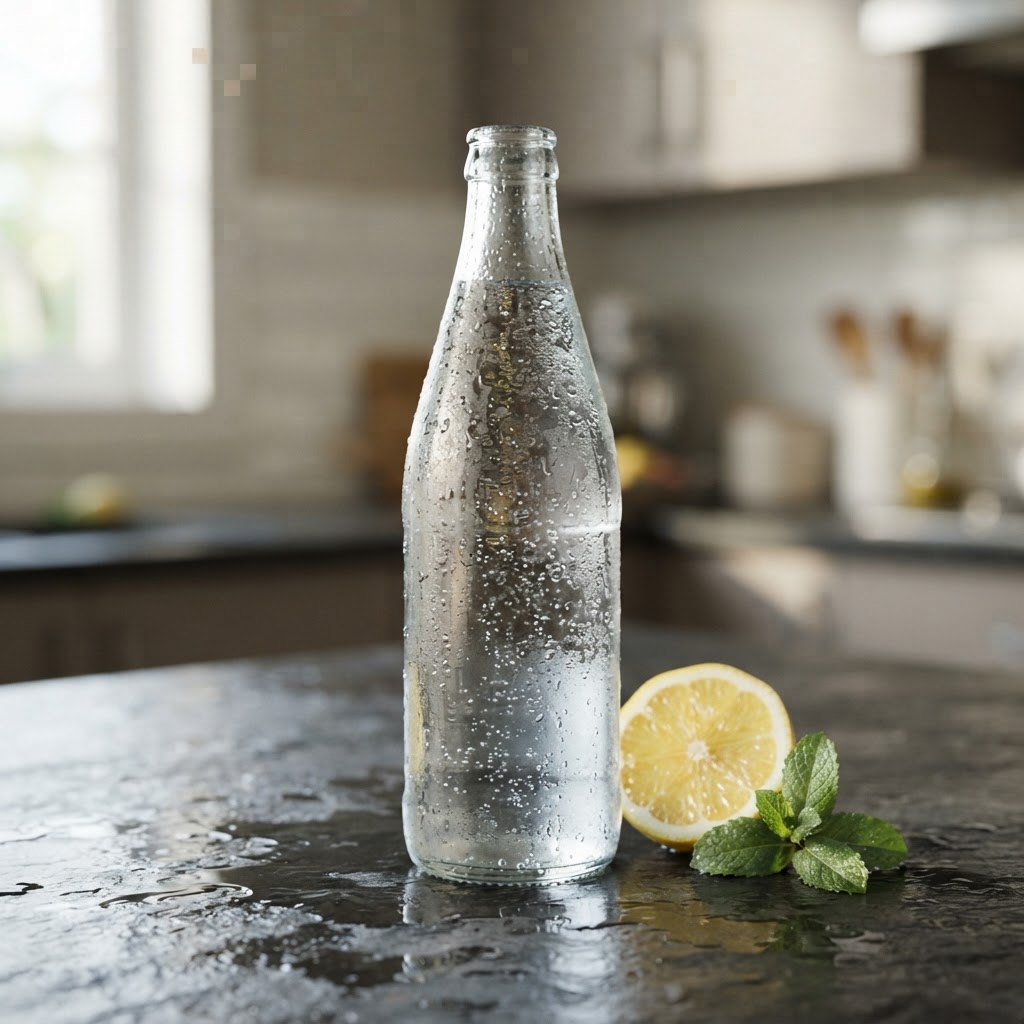
This is a standout output. Rather than treating “chilled” as shorthand for “droplets on clear glass,” it rendered genuine frosting on the glass surface, the kind you would see on a bottle taken out of the fridge minutes earlier, which is still transitioning between fully frosted and clear.
The bottle cap is visibly open, which makes the small, naturally rising internal bubbles physically justified rather than questionable. This is the only result that reads as authentically chilled rather than simply wet. It does lose some ground on background cleanliness (a bit of clutter) and has a minor pixelation artifact in one corner, but the core subject realism is the clear priority here.
Comparison table
| Factor | Grok (30) | ChatGPT 1.5 (150) | FLUX 2 Pro (200) | Nano Banana 2 Lite (50) |
|---|---|---|---|---|
| Core subject realism (chilled glass) | Weak | Weak | Present but subtle | Strongest |
| Water/condensation believability | Applied-looking | Applied-looking | Slightly unnatural pooling | Natural |
| Bubble realism | N/A | Excessive, implausible | Present, questionable | Justified by open cap |
| Lighting accuracy | Fair | Fair | Best | Fair |
| Background cleanliness | Extra object present | Good | Best | Some clutter |
| Technical polish (texture, framing) | Fair | Fair | Best | Good, minor artifact |
| Overall: real photo or AI? | Reads as AI | Reads as AI | Close, but detectable on inspection | Most convincing as real |
| Cost | 30 | 150 | 200 | 50 |
Does quality justify the cost?
- Grok Imagine (30 tokens): Cheapest, but weak on the category’s core test. Low cost doesn’t offset a failed subject.
- ChatGPT 1.5 (150 tokens): Mid-high cost for a result held back by both water realism and bubble plausibility. Not good value here.
- FLUX 2 Pro (200 tokens): Highest cost, and while it’s the most technically polished, it’s spending its budget on secondary details while underperforming on the primary one. The premium isn’t justified by realism outcome, even though the craftsmanship is real.
- Nano Banana 2 Lite: The lowest cost of the top performers and the clear winner on what actually matters most for this category, whether the photo reads as real.
Winner: Nano Banana 2 Lite
This model besides following the prompt, understood what the prompt was actually asking for and corrected a gap in its own wording. For instance, the term Chilled implies more than droplets appearing on a glas. Scientifically, or technically, a chilled glass bottle when left on a room temperature have that frosted surface.
I must appreciate that Nano Banana was the only one of the four models to reason that through rather than pattern-match the literal text. Combined with physically justified bubble behaviour tied to a visibly open cap, this is the most convincing real photograph of the set, at less than a third the cost of FLUX 2 Pro.
FLUX remains the strongest choice if secondary polish (lighting drama, background blur, texture sharpness) is the priority, but for photorealism judged by its true standard, which is to whether a photo pass as a real image, Nano Banana 2 Lite takes the cake.
Category 5: Text-Heavy Images (Infographic)
This category tests something fundamentally different from the earlier ones. It’s not about aesthetic, but whether the model can act as a reliable typesetting and layout engine rather than just a image generating tool. A dense info graphic prompt with fixed text, colours, sections, and icon rules is essentially a design brief with zero room for creative interpretation. Getting it right or wrong is largely binary.
What makes a good AI-generated text-heavy infographic?
- Prompt adherence: All six sections present, correct structure, no invented or missing elements, and no ignored restrictions.
- Text accuracy: Every word, number, date, and punctuation mark exactly as written, with no substitutions, typos, or invented text.
- Text legibility: Must be sharp, high-contrast, readable at normal screen size.
- Information hierarchy: Title dominant, headings next, details and labels appropriately smaller.
- Layout and spacing: Consistent margins, dividers, and grid structure.
- Visual system control: Only the specified colours and icons, no clutter, no unauthorized additions.
What commonly goes wrong?
- Text that looks like a real sentence at a glance but is actually garbled or nonsensical on closer reading
- Misspellings, invented words, or duplicated phrases
- Missing sections or reordered content
- Icons that don’t match what was specified, or extra decorative elements
- Broken grid alignment or uneven spacing
Why we pick this testing category?
As a content creator who has used AI for a fair share amount for designing when designers were busy, I would say that text-based image generation was worst when I started first. Even today, one cannot rely completely on AI for the same reason.
Most models consider text as shape and what they do is generate pattern-matching visual shapes rather than actually writing the text. This category exposes that gap more clearly than any other, so you don’t end up in a scenario where a minor spelling mistake that completely ruin the whole generation, and you end up punching your fist on the desk, thinking how close you were. Now you have to use another AI editing tool to fix it, that’s gonna add some extra dollars to your bills.
Prompt used
Create one vertical 4:5 infographic image at 1080 × 1350 pixels for a free digital-skills workshop. The final output must be a single finished infographic, not a mock-up, not a photographed poster, not a 3D render, and not a slide preview. Use a flat, clean, modern professional design only.
Use this fixed visual system: deep navy background #0B1F3A; white primary text #FFFFFF; teal accent #18B6B2; light cyan secondary accent #B9F3F0; muted pale-blue divider lines #7FA9C5. Use only these colours, except for black #000000 where required for small icon strokes. Do not use gradients, metallic effects, textures, shadows, glow, photographs, people, faces, hands, logos, brand marks, QR codes, watermarks, stickers, emojis, or decorative unreadable text.
Build the infographic inside a 72-pixel safe margin on all four sides. Divide the layout into six horizontal sections, separated by thin muted pale-blue divider lines. Maintain a consistent 24-pixel internal spacing scale. Use a clear sans-serif type style throughout; use uppercase only where specified below. All letters, numbers, punctuation, hyphens, en dashes, vertical bars, colons, and URL characters must be fully legible and reproduced exactly. Do not add, remove, substitute, misspell, abbreviate, reorder, or repeat any text.
Section 1 — Header: Place a small teal rounded rectangle at the top centre containing this exact uppercase text: “FREE LEARNING SESSION”. Directly below it, centred and in the largest white uppercase type, place exactly: “DIGITAL SKILLS WORKSHOP”. Directly below the heading, centred in smaller light-cyan text, place exactly: “Practical tools for work, business and content creation”. Add one thin teal horizontal line beneath this subheading.
Section 2 — Main message: Place this exact white heading, left aligned: “What you will learn”. Below it, show three equal horizontal rows. Each row must have one small teal line icon on the left, followed by the exact white text on the right. Row 1 text: “Use AI tools for everyday work”. Row 2 text: “Create social-media graphics in Canva”. Row 3 text: “Plan content that reaches more people”. Use only these three simple line icons: a sparkle icon for Row 1, a rectangular design-layout icon for Row 2, and a calendar icon for Row 3. Do not include any other icons.
Section 3 — Workshop details: Place this exact white heading, left aligned: “Workshop details”. Under it, create a two-column grid with two rows. In the upper-left cell, show a small teal calendar icon and this exact label beneath it in light-cyan text: “DATE”. Under the label, show this exact white text: “Saturday, 14 September”. In the upper-right cell, show a small teal clock icon and this exact label beneath it in light-cyan text: “TIME”. Under the label, show this exact white text: “10:00 AM–1:00 PM”. In the lower-left cell, show a small teal location-pin icon and this exact label beneath it in light-cyan text: “VENUE”. Under the label, show this exact white text: “Root Academy, Bhubaneswar”. In the lower-right cell, show a small teal people icon and this exact label beneath it in light-cyan text: “FOR”. Under the label, show this exact white text: “Students, freelancers and small businesses”.
Section 4 — Why attend: Place this exact white heading, left aligned: “Why attend?”. Under it, show exactly three short teal check marks, each followed by one white line of text. The three lines must read exactly: “No prior experience required”; “Hands-on guidance”; “Free registration”. Keep all three lines left aligned with equal vertical spacing.
Section 5 — Registration: Create a full-width teal rectangular panel with square corners. Inside it, centre this exact uppercase navy text in bold: “LIMITED SEATS — REGISTER NOW”. Under it, centre this exact navy text: “Registration closes on 12 September”. Do not include a button, QR code, phone number, email address, or any extra call to action.
Section 6 — Footer: At the bottom centre, place exactly this light-cyan text: “www.rootacademy.in”. Directly below it in smaller muted pale-blue text, place exactly: “Free workshop | Advance registration required”.
Keep the overall style informational, calm, organised, and highly readable. The hierarchy must be unambiguous: “DIGITAL SKILLS WORKSHOP” is the largest text; section headings are the next largest; workshop details and learning rows are medium-sized; labels and footer text are smallest. Every required text line must remain readable at normal mobile-screen viewing size. Use no text other than the exact text supplied in this prompt.
Verdict
Image 1: FLUX 2 Pro
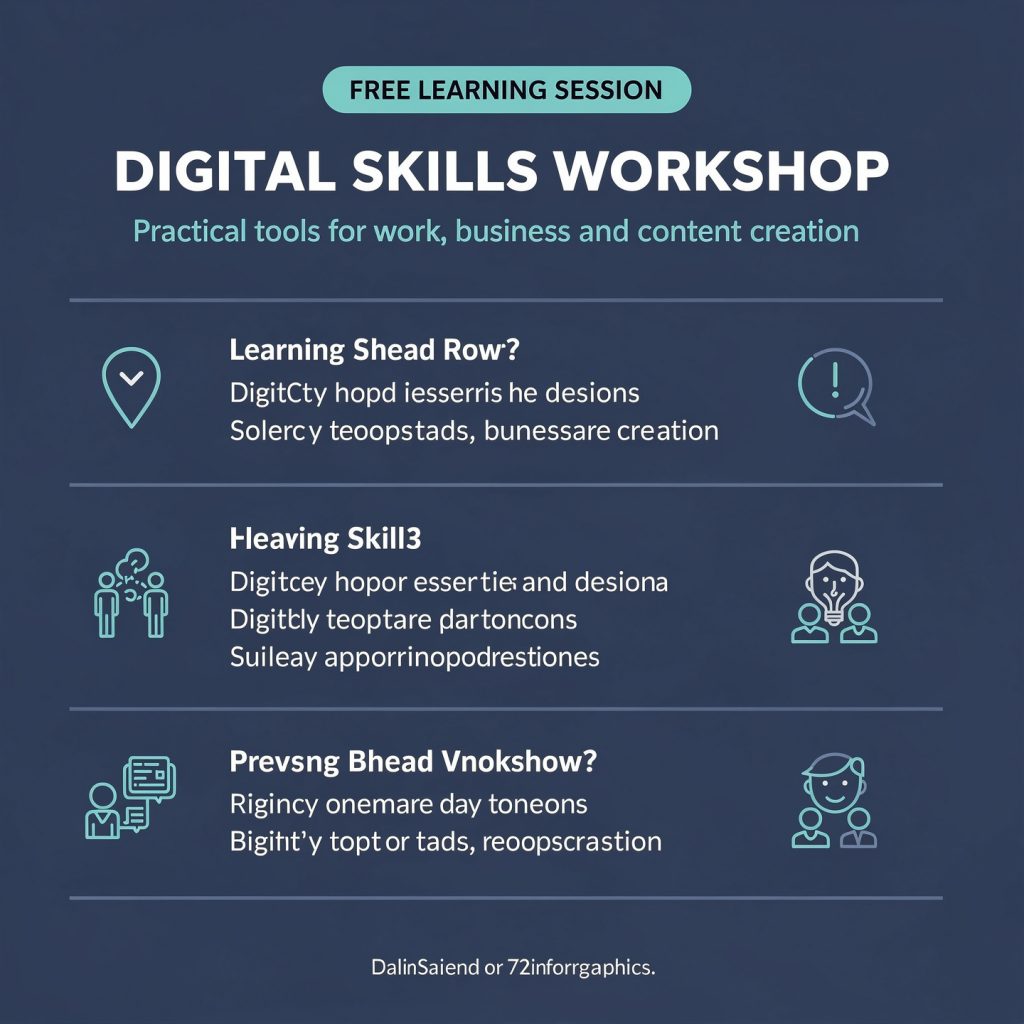
- The header (“FREE LEARNING SESSION,” “DIGITAL SKILLS WORKSHOP,” and the subheading) rendered correctly, but from Section 2 onward, the text collapses into garbled, nonsensical strings.
- “Learning Shead Row,” “DigitCty hopd iesserris he desions,” “Heaving Skill3,” “Suileay apporrinopodrestiones.” None of this is real text .
- The footer reads “DalinSaiend or 72inforrgaphics,” which is nonsense. Sections 3, 4, and 5 (workshop details, why attend, registration panel) are missing entirely.
Image 2: ChatGPT

- All six sections are present in the correct order.
- Every text string matches the prompt exactly that includes dates, times, venue, audience description, the “Why attend” checklist, the registration panel copy, and the footer URL and tagline all read correctly.
- Colours match the specified palette (navy background, teal accent, light cyan secondary, muted pale-blue dividers).
- Icons are correctly assigned per row (sparkle, layout, calendar; then calendar, clock, pin, people).
- Hierarchy is clear and matches the brief.
- Spacing and dividers are clean and consistent.
Image 3: Nano Banana 2 Lite
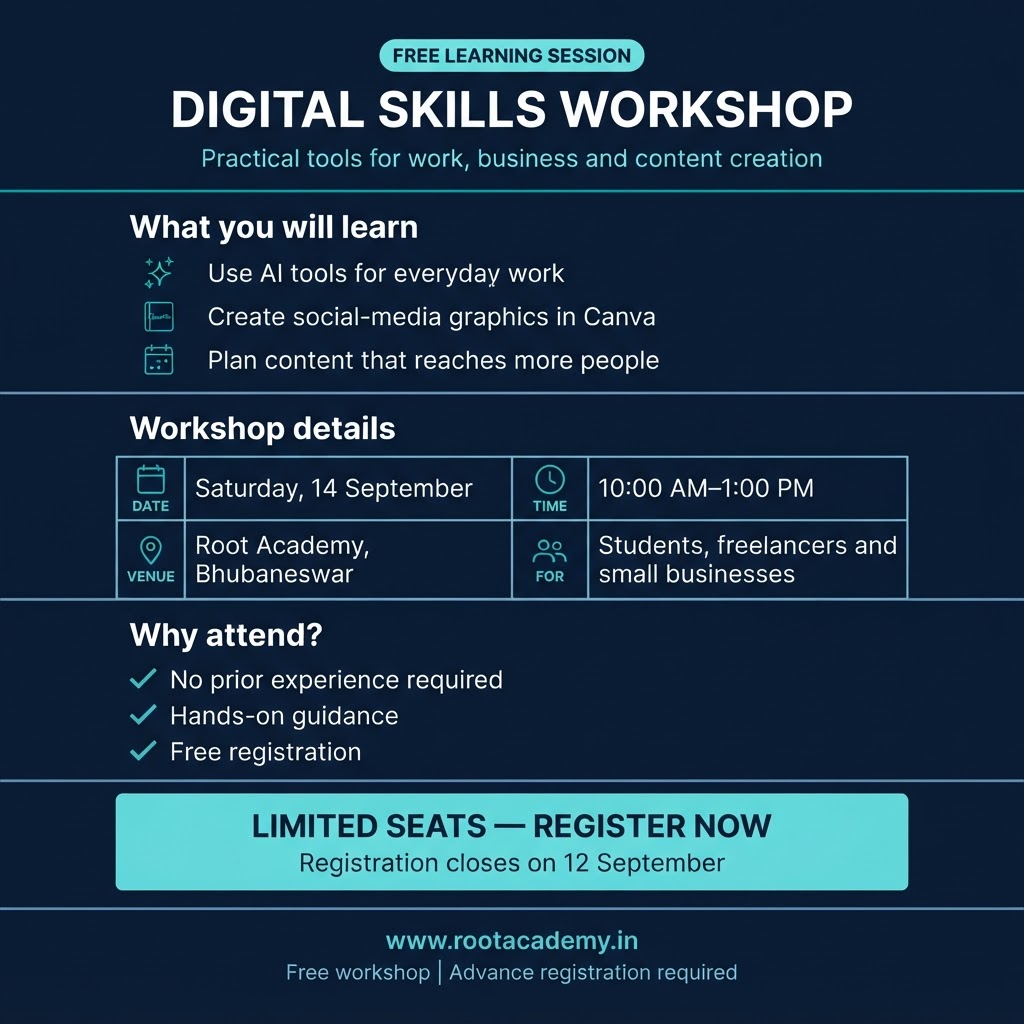
Also very strong.
All text is accurate and complete, all six sections present, correct colors and icon assignments.
The main structural difference from the brief is Section 3. Instead of the specified two-column grid with icon-label-value stacked in each cell, it renders as a bordered table with icons and labels beside the values in each row. This is a legitimate layout deviation from “two-column grid with two rows” as literally specified, though it’s still clean, readable, and functionally equivalent.
Everything else including text accuracy, hierarchy, spacing, and colour control is on par with the ChatGPT result.
Image 4: Grok Imagine
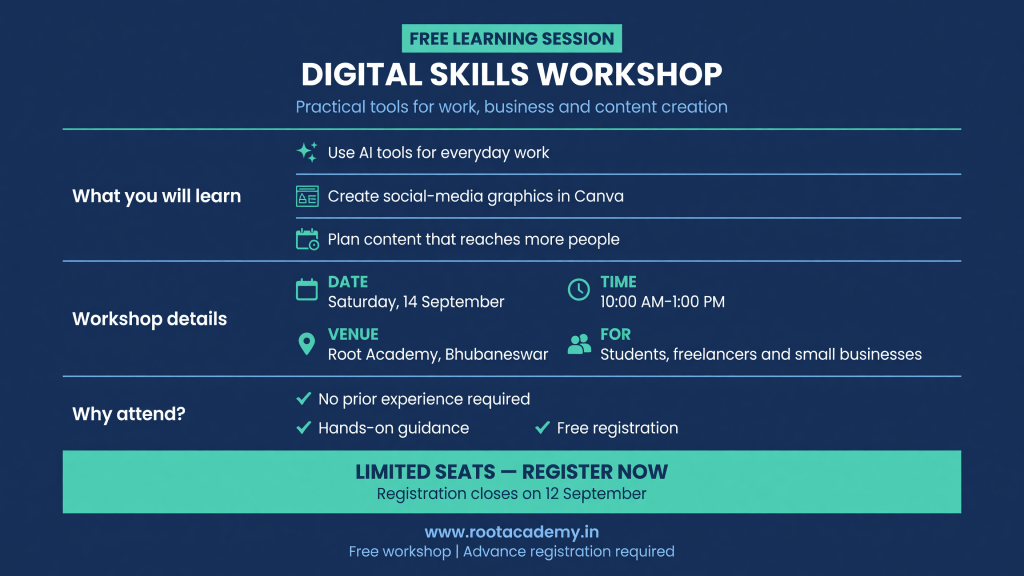
Strong text accuracy
Every string matches the prompt exactly, no typos or invented content. However, the layout deviates more significantly from the brief than Image 3. Section 2 (“What you will learn”) is restructured as a sidebar label next to three stacked rows rather than a heading above three equal horizontal rows with individual icons per row as specified — functionally similar in content but structurally different from the instruction. The overall visual style also shifts to a wider landscape format rather than the specified vertical 4:5 1080×1350 layout, which is a meaningful deviation from an explicit technical requirement in the prompt. Colors and icons are correctly controlled.
Comparison table
| Factor | FLUX 2 Pro | ChatGPT | Nano Banana 2 Lite | Grok Imagine |
|---|---|---|---|---|
| Prompt adherence (sections) | Fails. 3 sections missing | Full compliance | Full compliance | Full compliance (restructured) |
| Text accuracy | Fails. Mostly garbled nonsense | Exact match | Exact match | Exact match |
| Text legibility | Fails where text renders | Sharp, clear | Sharp, clear | Sharp, clear |
| Information hierarchy | N/A. incomplete | Correct | Correct | Correct |
| Layout and spacing | Fail. Incomplete | Matches brief closely | Minor grid deviation | Format and aspect deviation |
| Visual system/icon control | Partial (header only) | Fully correct | Fully correct | Fully correct |
| Aspect ratio (4:5 vertical) | Vertical, matches | Vertical, matches | Vertical, matches | Landscape. does not match |
| Cost | 200 | 150 | 50 | 30 |
- FLUX 2 Pro (200 tokens): The most expensive model produced the least usable output by a wide margin. Zero value here for this specific task, regardless of price. Not made for text.
- Grok Imagine: Cheapest option, and it got the actual text right, which is the hardest part of this category. For the price, this is a genuinely strong outcome.
- Nano Banana 2 Lite : Very close to a perfect result at a low cost, with only a minor grid-structure deviation in one section. Excellent value.
- ChatGPT: The most faithful to the literal brief across every factor, including the exact two-column grid structure that both Nano Banana and Grok interpreted slightly differently. Costs three times more than Nano Banana for a result that’s marginally more precise.
Overall Verdict: Which Model Actually Wins?
Across the five categories, no model swept the board. FLUX 2 Pro is the only dependable choice for faithful enhancement of an existing image.
| Category | Winner | Runner-up / value pick |
|---|---|---|
| Portrait & Headshot | ChatGPT 1.5 | — |
| Face Swap & Consistency | Nano Banana 2 Lite | FLUX 2 Pro, marginal edge at 4× the cost |
| Upscaling | FLUX 2 Pro | Nano Banana 2 Lite, if framing fidelity is not important |
| Photorealism | Nano Banana 2 Lite | — |
| Text-Heavy Infographic | ChatGPT 1.5 | Nano Banana 2 Lite |
Nano Banana 2 Lite and ChatGPT 1.5 each win two categories, while FLUX 2 Pro wins one. Grok Imagine does not take a category, but remains the lowest-cost option and can still produce usable results, particularly for text-heavy images, where it achieved accurate text at a low token cost.
Best Overall: Nano Banana 2 Lite
If you can choose only one default model, Nano Banana 2 Lite remains the strongest all-round value choice. It wins Face Swap & Consistency and Photorealism, and is a competitive runner-up for text-heavy graphics at 50 tokens, far below the cost of FLUX 2 Pro and ChatGPT 1.5.
Its strongest performance was photorealism. It produced the most convincing chilled-drink interpretation rather than merely rendering the literal object list. The trade-off is instruction fidelity in image-to-image tasks. It may extend or recompose framing rather than strictly preserving it.
Best for Precision: ChatGPT 1.5
ChatGPT 1.5 remains best for Portrait & Headshot and Text-Heavy Infographics. It handled dense instructions, layout, and readable text more reliably than the alternatives in those categories.
However, it is not a safe default for image upscaling. In the revised test, it altered the subject’s identity and extended the composition to the waist, despite no instruction to do so. Use it for controlled generation from prompts, but not for faithful enhancement of real photographs.
Best for Existing Photos: FLUX 2 Pro
FLUX 2 Pro is the clear choice when preserving an existing photo matters. It retained the original framing, maintained subject identity, and delivered the strongest detail recovery in the upscaling test. The others reframed or expanded the image, while ChatGPT 1.5 also produced a different-looking person.
The cost is 200 tokens, and FLUX’s weak text-heavy performance remains a major limitation. It should be treated as a specialist tool for photographic fidelity, not as the universal winner.
Best on a Budget: Grok Imagine
Grok Imagine is the budget option at 30 tokens. It did not win a category, but it was reasonably capable across the test and delivered accurate text in the text-heavy task. Its limitations are softer detail recovery and a tendency to alter framing in upscaling.
If I am being Honest
- Nano Banana 2 Lite: best overall value and photorealistic generation.
- ChatGPT 1.5: portraits and text-heavy layouts.
- FLUX 2 Pro: faithful upscaling and preservation of real photographs.
- Grok Imagine: lowest-cost, usable general-purpose alternative.
Before I start my next comparison
One more thing worth saying before you runs your own tests. Everything you saw above was based on one core thing- a detailed and well-written prompt. Write it differently or loosely, and you will get a genuinely different set of results.
A loosely-written prompt gives more freedom to the model to interpret things on its own way. This is where most users end up with that AI just gives generic, repetitive results argument.
This is why prompt engineering actually matters. You don’t need to master coding but need to able to express your requirements perfectly, just like writing a personal journal. But also means to understand how the model is going to read what you type, because it’s not interpreting your words the way another person would. Get to know how it thinks, and it gets a lot easier to get it to understand you.
If you need an honest, no-nonsense comparison of any apps or AI tools for your own business or project, reach out to us, we’re happy to help you figure out what’s actually worth paying for.