
Best Gemini AI Prompts 2025: Nano Bananas, Bollywood Posters, Polaroids & More
September 18, 2025Artificial intelligence is transforming how we edit and share photos online. Among the most popular tools, Google’s Gemini has taken center stage in 2025, inspiring viral edits and creative trends. From miniature Nano Banana figurines to nostalgic Polaroid snapshots and dramatic Bollywood poster effects, Gemini prompts are everywhere on social media.
If you’re looking for inspiration, here are the most talked-about Gemini prompt ideas you can try right now, complete with ready-to-use examples.
1. Nano Banana Figurines
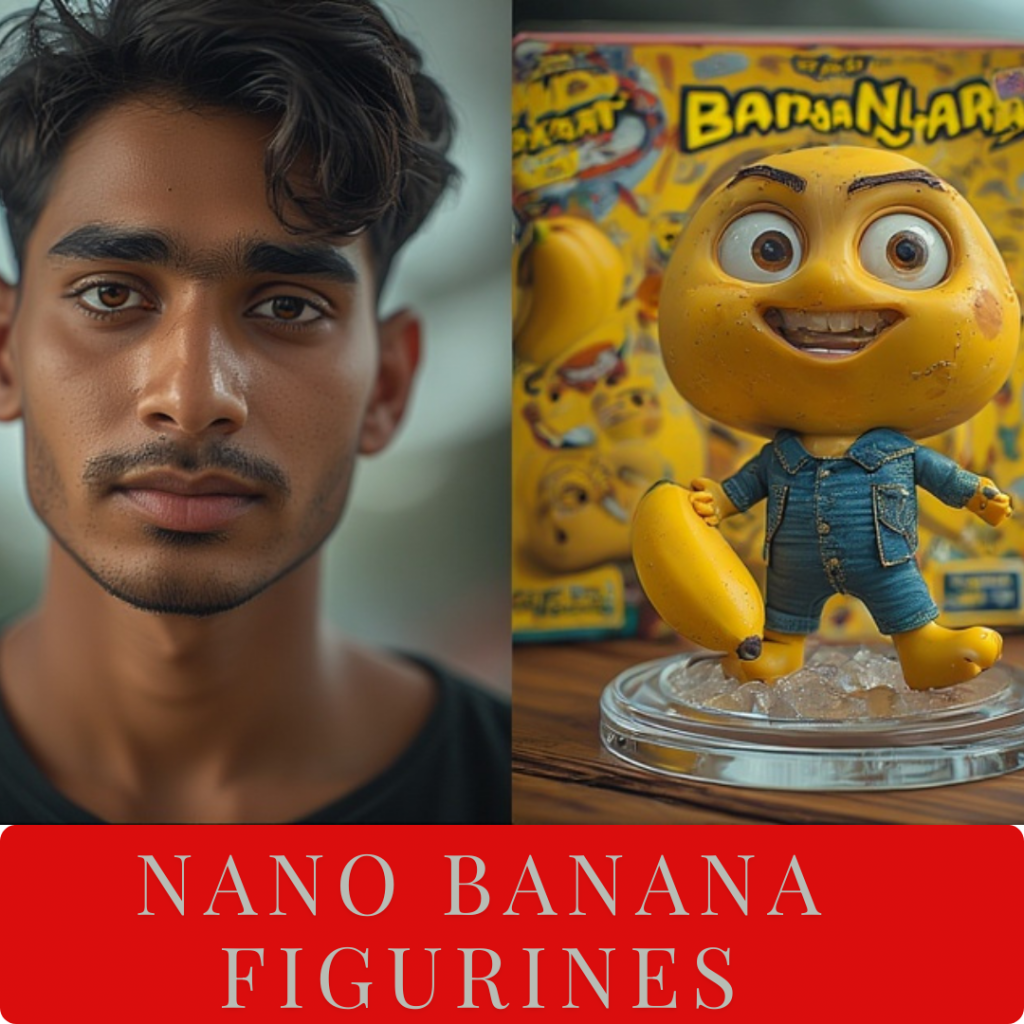
The Nano Banana trend has exploded because it transforms ordinary selfies into tiny 3D figurines that look like anime toys or collectible action models. Unlike standard filters, this style makes people look playful, cute, and unique, which is why it’s so widely shared on Instagram and WhatsApp groups.
For example, a college student might upload a casual selfie and instantly get a version of themselves as a pocket-sized cartoon figurine with oversized features and vibrant colors. The results often look like something you’d find in a gaming universe or as a collectible toy on a shelf.
Try this prompt:
Turn my selfie into a Nano Banana style 3D figurine with toy-like proportions, bright colors, and high-detail textures.
2. Bollywood Movie Poster Style
Bollywood poster edits bring a cinematic flair to everyday portraits. With bold typography, retro colors, and dramatic lighting, the results look like a movie release from decades past.
For example, imagine taking a simple portrait from your phone and Gemini turns it into a 1990s-style Bollywood poster, complete with glowing lights, over-the-top poses, and title-style text. It instantly makes your picture look like it belongs on a cinema billboard. Some users even add funny titles and taglines to make their edits look like spoof movie posters.
Try this prompt:
Make my portrait look like a Bollywood movie poster with retro typography, 90s film colors, and cinematic lighting.
3. Polaroid and Instant Film Aesthetic
The instant film look never goes out of style. Gemini can recreate the soft tones and iconic borders of Polaroid pictures, giving your edits a nostalgic, candid charm.
For example, a travel blogger might upload a beach photo and Gemini transforms it into a vintage Polaroid print — complete with the white frame and slightly faded colors. Some people even add handwritten captions on the border before posting, which makes it feel like a snapshot from a family album.
Try this prompt:
Create a Polaroid style photo with soft vintage tones, instant film border, and candid snapshot effect.
4. Festival and Cultural Themes
Festivals like Durga Puja, Diwali, and Holi are perfect occasions for creative AI edits. Gemini can blend traditional attire, cultural backdrops, and festive lighting to create portraits that feel vibrant and celebratory.
For example, someone might take a simple selfie at home, and Gemini can instantly turn it into a Durga Puja-inspired portrait — complete with a saree, temple backdrop, glowing diyas, and the warm golden tones of a pandal. During Holi, many users edit their photos with splashes of bright colors, making it look like they were right in the middle of the celebrations.
Try this prompt:
Edit my portrait in traditional Durga Puja attire with pandal background, warm lighting, and festive glow.
5. Hug My Younger Self Trend
One of the most heartfelt trends this year is the Hug My Younger Self edit. It combines a childhood photo with a current one, creating the illusion that you’re embracing your younger version. The result is deeply nostalgic and emotional, making it one of the most widely shared AI edits online.
For example, someone might upload their recent graduation picture along with an old school photo. Gemini then generates a moving image of the graduate hugging their younger self in school uniform — a visual that feels symbolic of growth, resilience, and achievement.
Try this prompt:
Combine my current portrait with my childhood photo, showing me hugging my younger self in a nostalgic Polaroid frame.
6. Professional Quality Images
Gemini is a powerful tool for creating polished, professional photos. Whether you need a LinkedIn profile picture, an online shop product image, or a resume-ready headshot, the right prompts can deliver results that look like they were taken in a studio.
For example, a job seeker might upload a casual selfie and Gemini transforms it into a clean, formal headshot with crisp lighting and a neutral background, perfect for LinkedIn or CVs. Similarly, small business owners are using Gemini to create professional product listings without expensive photography equipment.
Try this prompt (profile photo):
Generate a professional profile picture with studio lighting, natural skin tones, and high-resolution clarity.
Try this prompt (product shot):
Create a product showcase with a clean white background, soft shadows, and realistic details.
7. Childhood Memory Photo Edits
Beyond the Hug My Younger Self trend, childhood photo editing has become one of Gemini’s most emotional features. Users are recreating old memories, enhancing faded childhood photos, or blending past and present in creative ways that feel deeply personal.
For example, someone might upload a grainy childhood photo from the 1990s and Gemini enhances it with vivid colors and clarity while keeping that nostalgic film camera feel. Others create comparison edits showing their childhood self next to their current photo in matching poses — perfect for birthday posts or milestone celebrations that reflect personal growth.
Try this prompt:
Enhance my childhood photo with vibrant colors, soft nostalgic tones, and vintage film texture while preserving the original memory.
8. Couple and Romance Photo Edits
Couple photos get a romantic upgrade with Gemini’s editing capabilities. From dreamy Polaroid-style date night snapshots to cinematic anniversary portraits, these edits help couples create Instagram-worthy memories without professional photographers.
For example, a couple might take a simple selfie during their evening walk and Gemini transforms it into a soft, vintage Polaroid-style image with warm lighting and instant film borders — the kind of photo you’d want to print and frame. Many couples use these edits to announce engagements, celebrate anniversaries, or simply create aesthetic content for their relationship posts.
Try this prompt:
Transform our couple photo into a romantic Polaroid style with soft vintage tones, warm lighting, and instant film border.
9. Toy and Figurine Transformations
Similar to Nano Banana but with more collectible toy vibes, these prompts turn your photos into realistic action figures or designer toys complete with packaging. It’s like seeing yourself as a limited-edition product on a collector’s shelf.
For example, a gaming enthusiast might upload their gaming setup photo and Gemini creates a version where they’re a collectible figurine with PVC texture, transparent acrylic base, and a retail-style packaging box in the background showing the “original character design.” These edits often go viral because they look surprisingly realistic and playful at the same time.
Try this prompt:
Turn my photo into a realistic toy figurine with PVC material texture, transparent base, and collectible packaging box in the background.
10. Professional Photos for LinkedIn and Resumes
Gemini isn’t just for fun — it’s become a go-to tool for career-focused images. Job seekers, freelancers, and professionals are using it to create polished headshots without spending money on studio photography sessions.
For example, a recent graduate preparing job applications might upload a casual outdoor selfie and Gemini transforms it into a clean, professional headshot with studio lighting, neutral background, and business-appropriate tones — perfect for LinkedIn profiles, resumes, or company directories. Small business owners also use these prompts to create consistent professional images across all their online platforms.
Try this prompt:
Create a professional LinkedIn profile picture with studio lighting, neutral background, natural skin tones, and high-resolution clarity.
11. Graduation and Milestone Celebration Photos
Graduation photos deserve special treatment, and Gemini helps make them look professionally shot. Whether it’s enhancing lighting, adding cinematic effects, or creating formal portraits, these edits turn smartphone photos into frame-worthy memories.
For example, a college graduate might take a quick selfie after their ceremony and Gemini transforms it into a professional graduation portrait with perfect lighting, rich academic colors, and formal photography quality. Parents love these edits because they can finally get that “official graduation photo” even if they missed booking a professional photographer.
Try this prompt:
Enhance my graduation photo with professional studio lighting, rich academic colors, and formal portrait quality.
12. Cartoon and Anime Style Edits
Anime and cartoon transformations remain wildly popular, especially among younger users and content creators. Gemini can turn realistic photos into various animation styles — from Studio Ghibli aesthetics to modern anime character designs.
For example, an anime fan might upload their cosplay photo and Gemini converts it into authentic anime art with large expressive eyes, vibrant hair colors, manga-inspired backgrounds, and that characteristic Japanese animation style. Some users create entire Instagram carousels where each slide shows their photo in different animation styles, and these posts consistently get high engagement.
Try this prompt:
Transform my photo into anime art style with large expressive eyes, vibrant colors, manga details, and Japanese animation aesthetics.
13. Mirror Selfie Aesthetic Upgrades
Mirror selfies are social media staples, and Gemini elevates them with trendy room aesthetics and influencer-worthy backgrounds. These edits transform basic bathroom mirror shots into aesthetic bedroom vibes that look like they belong in a lifestyle magazine.
For example, someone might take a simple mirror selfie in their bathroom and Gemini changes the background to an aesthetic bedroom with fairy lights, posters, plants, and trendy décor — basically turning their ordinary selfie into an influencer-style room tour shot. These edits are perfect for Instagram stories and reels that need that extra visual appeal.
Try this prompt:
Enhance my mirror selfie with aesthetic bedroom background, warm lighting, trendy room décor, and Instagram-worthy quality.
14. Maternity and Pregnancy Portrait Edits
Expecting parents are using Gemini to create beautiful maternity photos without booking expensive photography sessions. These edits add soft glowing lighting, elegant backgrounds, and that professional pregnancy photography aesthetic.
For example, a mother-to-be might upload a simple home photo and Gemini transforms it into a glowing maternity portrait with studio-quality lighting, serene background, and that ethereal pregnancy photography feel that usually costs hundreds of dollars. Many couples use these edits for pregnancy announcements on social media or to create keepsake photo albums.
Try this prompt:
Create a beautiful maternity portrait with soft glowing lighting, elegant background, and professional pregnancy photography aesthetics.
15. Family Portrait Edits (Father-Daughter, Mother-Son)
Family photos get the professional treatment with Gemini’s portrait enhancement features. Whether it’s father-daughter bonding moments, mother-son memories, or multi-generational portraits, these edits capture family connections beautifully.
For example, a father and daughter might upload their casual weekend photo and Gemini transforms it into a heartwarming professional portrait with perfect lighting, emotional depth, and that timeless family photography quality you’d see in professional studios. These become cherished family memories that look good enough to print and frame for the living room wall.
Try this prompt:
Create a heartwarming father and daughter portrait with professional lighting, warm tones, and emotional depth.
Try this prompt (for mother-son):
Generate a beautiful mother and son portrait with studio lighting, soft background, and family photography aesthetics.
16. Baby and Kids Photo Edits
Baby photos get an adorable upgrade with Gemini’s editing features. Parents are creating professional-quality baby portraits, cute baby girl aesthetic edits, and playful kids’ photo transformations that capture childhood innocence beautifully.
For example, new parents might upload a simple nursery photo of their baby girl and Gemini transforms it into a professional baby photoshoot with soft lighting, pastel tones, and that dreamy newborn photography aesthetic. Many parents use these edits for birth announcements, monthly milestone posts, or to create beautiful photo albums without hiring expensive baby photographers.
Try this prompt:
Create a beautiful baby girl portrait with soft pastel tones, gentle lighting, and professional newborn photography aesthetics.
Try this prompt (for kids):
Transform my child’s photo with playful colors, bright lighting, and cheerful kids’ photography style.
17. Retro 90s and Vintage Film Edits
The 90s nostalgia trend is huge, and Gemini captures that retro film camera aesthetic perfectly. From grainy film textures to faded vintage colors, these edits transport your photos back to the golden era of analog photography.
For example, someone might upload a modern smartphone selfie and Gemini transforms it into a 90s-style photo with grainy texture, faded warm tones, and that authentic film camera look that defined the decade. Fashion bloggers especially love this aesthetic for throwback-themed content that feels genuinely vintage rather than artificially filtered.
Try this prompt:
Create a 90s retro photo with grainy film texture, faded vintage colors, and authentic analog camera aesthetics.
Try this prompt (film poster style):
Transform my photo into a retro film poster with vintage typography, classic movie colors, and old-school cinema vibes.
18. Background Change and Replacement
One of Gemini’s most practical features is background replacement. Whether you need a professional plain background for work photos or want to change your location entirely, these prompts make it seamless.
For example, someone working from home might have a cluttered background in their video call screenshot, and Gemini changes it to a clean office setting or neutral backdrop — perfect for professional presentations. Travel enthusiasts also use this to enhance their vacation photos by improving backgrounds while keeping themselves in focus.
Try this prompt:
Change my photo background to a clean neutral backdrop with soft shadows and professional studio setting.
Try this prompt (creative background):
Replace my background with an aesthetic urban street setting with natural lighting and depth of field blur.
19. Outfit and Dress Change Edits
Gemini can transform your outfit without needing a wardrobe change. From traditional saree looks to formal business attire, these edits let you visualize different styles instantly.
For example, a woman might upload her casual photo and Gemini transforms her outfit into an elegant black saree with traditional jewelry and styling — creating a stunning traditional look without actually wearing the outfit. This is popular for visualizing outfit ideas before events or creating diverse content for fashion pages.
Try this prompt:
Transform my outfit into an elegant black saree look with traditional jewelry, draped styling, and cultural aesthetics.
Try this prompt (formal wear):
Change my casual outfit to professional business attire with formal styling and corporate-appropriate appearance.
20. Product Photography for Small Businesses
Small business owners and entrepreneurs are using Gemini to create professional product photos without expensive equipment. These edits turn simple smartphone product shots into e-commerce ready images.
For example, a home baker might photograph their cake on a kitchen counter and Gemini transforms it into a professional product shot with clean white background, perfect lighting, and commercial photography quality — exactly what’s needed for online shop listings or social media marketing.
Try this prompt:
Create a professional product photo with pure white background, soft shadows, and commercial e-commerce photography quality.
21. Selfie Enhancement and Aesthetic Upgrades
Regular selfies get the aesthetic treatment with Gemini’s enhancement capabilities. From improving lighting to adding trending effects, these prompts help your selfies stand out on social media feeds.
For example, someone might take a basic front-camera selfie in average lighting and Gemini enhances it with perfect lighting, subtle skin smoothing, and that polished influencer-quality finish that makes selfies look professionally shot. Mirror selfie aesthetics are especially popular, with users transforming bathroom mirrors into aesthetic bedroom settings.
Try this prompt:
Enhance my selfie with perfect lighting, natural skin tones, and aesthetic social media quality.
Try this prompt (mirror selfie):
Transform my mirror selfie with aesthetic background, warm lighting, and Instagram influencer vibes.
22. Hugging and Emotional Connection Edits
Beyond the “Hug My Younger Self” trend, hugging prompts create heartwarming edits showing connection between people. These emotional photos resonate deeply and often become the most saved and shared content.
For example, best friends might upload their individual photos and Gemini creates a touching scene of them hugging with warm lighting and emotional depth — perfect for friendship day posts or nostalgic throwback content. The emotional authenticity of these edits makes them incredibly popular for relationship posts.
Try this prompt:
Create a heartwarming hugging scene with emotional depth, warm lighting, and touching friendship vibes.
23. Cinematic and Movie Still Aesthetics
Cinematic edits make your photos look like they’re stills from actual movies. With dramatic lighting, film-like color grading, and professional cinematography effects, these transformations are stunning.
For example, a content creator might upload their outdoor portrait and Gemini transforms it into a cinematic movie scene with golden hour lighting, film grain texture, and that epic storytelling quality you see in blockbuster films. These edits work exceptionally well for reels, YouTube thumbnails, and portfolio content.
Try this prompt:
Transform my photo into a cinematic movie still with dramatic lighting, film color grading, and Hollywood production quality.
Try this prompt (nano banana cinematic):
Create a cinematic Nano Banana figurine scene with movie-quality lighting, depth, and theatrical presentation.
24. Best Friend and Group Photo Edits
Group photos and best friend pictures get professional treatment with coordinated edits. These prompts help create matching aesthetics across multiple people in one frame.
For example, a group of friends celebrating together might upload their group selfie and Gemini transforms it into a professional group portrait with balanced lighting on everyone, coordinated color tones, and that polished look where everyone looks equally good — solving the common problem of uneven lighting in group shots.
Try this prompt:
Enhance our group photo with balanced lighting, coordinated color tones, and professional group portrait quality.
Try this prompt (best friends):
Create a best friends aesthetic photo with warm tones, emotional connection, and Instagram-worthy friendship vibes.
25. Trending Gemini Effects 2025
Staying updated with the latest trending Gemini effects keeps your content fresh. From new aesthetic styles to viral editing trends, these prompts capture what’s currently popular across social media platforms.
For example, right now the “polaroid aesthetic” with handwritten-style captions is trending massively on Instagram reels. Users upload their couple photos or friend group pictures, and Gemini creates vintage Polaroid frames with space for custom text overlays — creating that authentic instant camera nostalgia that gets thousands of likes.
Try this prompt (current trend):
Create a trending polaroid aesthetic with vintage frame, soft tones, and space for handwritten-style text overlay.
Try this prompt (viral style):
Apply the latest viral Gemini effect with trending colors, popular aesthetic elements, and Instagram-worthy quality.
How to Edit Photos in Gemini AI
Many people search for step-by-step guidance on actually using Gemini for photo editing. The process is straightforward once you understand the basics of how to format prompts and upload images correctly.
To edit photos in Gemini AI, you simply open the Gemini app or website, upload your photo, and type a descriptive prompt explaining exactly how you want the image transformed. The more specific your description — including details about lighting, colors, mood, and style — the better your results will be. You can generate multiple versions by tweaking your prompt slightly each time.
For example, if your first attempt doesn’t look quite right, instead of saying “make it better,” try being specific like “add warmer golden tones” or “soften the background blur more.” This helps Gemini understand exactly what adjustments you want, giving you control over the final output without needing any technical photo editing skills.
Copy-Paste Gemini Prompts Library
Here’s a ready-to-use collection of the best Gemini prompts you can copy and paste directly. Just upload your photo and paste these prompts to get instant professional results.
For Professional Photos:
Create a professional LinkedIn profile picture with studio lighting, neutral gray background, business attire, and high-resolution clarity suitable for corporate profiles.
For Aesthetic Instagram Posts:
Transform my photo into Instagram aesthetic with vibrant trending colors, soft lighting, influencer-quality editing, and social media optimized composition.
For Vintage Effects:
Apply authentic 90s vintage film photography with grainy texture, faded warm colors, retro tones, and nostalgic analog camera feel.
For Couple Photos:
Create a romantic couple portrait with dreamy lighting, warm tones, emotional connection, and relationship post-worthy quality.
For Product Photography:
Generate professional product photo with pure white background, soft commercial lighting, e-commerce quality, and clean presentation.
For Baby Photos:
Transform baby photo into professional newborn portrait with soft pastel lighting, gentle tones, and adorable baby photography aesthetics.
For Traditional/Festival Looks:
Create Diwali festival portrait with traditional attire, warm glowing lights, cultural elements, and celebratory festive atmosphere.
For Childhood Edits:
Enhance childhood photo with vibrant nostalgic colors, soft vintage lighting, preserved memories, and emotional throwback quality.
For Cinematic Style:
Transform into cinematic movie still with dramatic lighting, film color grading, depth of field, and Hollywood production aesthetics.
For Graduation Photos:
Create professional graduation portrait with academic regalia, formal lighting, milestone celebration vibes, and frame-worthy quality.
Gemini Photo Editor Link and Access
People often search for the direct Gemini photo editor link to access the tool quickly. You can access Gemini AI’s photo editing features through the official Google Gemini website or by downloading the Gemini app on your smartphone.
The easiest way is to simply visit gemini.google.com and sign in with your Google account. Once logged in, you’ll see an option to upload images where you can then type your editing prompts. The mobile app works identically, making it convenient to edit photos directly from your phone’s camera roll wherever you are.
For example, many users bookmark the Gemini link on their phone’s home screen for quick access whenever they want to edit photos on the go. Whether you’re preparing content for Instagram stories or need a quick professional headshot, having instant access makes the editing process seamless and fast.
Quick Tips for Better Gemini Results
- Be descriptive: Mention lighting, mood, and style in detail.
- Think like a director: The more clearly you describe your “scene,” the better the AI interprets it.
- Experiment: Try different adjectives like cinematic, glossy, nostalgic, warm to see what resonates.
- Save your favorites: Once you find a prompt that works, keep it handy for future edits.
Step-by-Step Guide to Add Prompt in Gemini AI
Step 1: Access Gemini AI
- Open your browser or Gemini AI app.
- Log in to your account (or create one if you don’t have it).
Step 2: Start a New Project or Edit
- Look for a “Create” or “New Edit” button.
- Click it to open a blank canvas for your AI prompt.
Step 3: Upload Your Base Image (Optional)
- If you want to edit a photo, click “Upload”.
- Choose your image from your device.
- You can also start without an image if you want Gemini to generate something from scratch.
Step 4: Enter Your Prompt
- Locate the prompt input box.
- Type your descriptive prompt. For example:
- Nano Banana style figurine:
“Turn my selfie into a Nano Banana style 3D figurine with toy-like proportions, bright colors, and high-detail textures.” - Bollywood poster:
“Make my portrait look like a Bollywood movie poster with retro typography, 90s film colors, and cinematic lighting.”
- Nano Banana style figurine:
- Be specific about style, colors, lighting, and mood.
Step 5: Configure Settings
- Some options may appear for:
- Resolution or quality
- Style variations (realistic, cartoonish, cinematic, etc.)
- Aspect ratio (square, portrait, landscape)
- Adjust according to your goal.
Step 6: Generate the Edit
- Click “Generate” or “Run AI”.
- Wait for Gemini to process your prompt.
- Review the output once it appears.
Step 7: Refine or Regenerate
- If it’s not perfect, tweak your prompt:
- Add more descriptive adjectives
- Specify lighting, colors, or expressions
- Click “Regenerate” to create a new version.
Step 8: Save or Share
- Once satisfied, click “Download” or “Save”.
- You can now share it on social media or use it for personal projects.
FAQs
Q1. How do I make Nano Banana figurines with Gemini?
Describe your selfie as a 3D figurine with toy-like features, bright colors, and detailed textures.
Q2. Can Gemini create Bollywood-style posters?
Yes — mention elements like retro typography, bold colors, and cinematic lighting to capture that dramatic poster vibe.
Q3. How do I get the Polaroid effect in Gemini?
Ask for instant film borders, soft vintage tones, and a candid look for the classic Polaroid feel.
Q4. Is Gemini free to use?
Gemini offers free outputs, but premium options give higher resolution and faster processing.
Q5. What is the Hug My Younger Self trend?
It’s a Gemini prompt that blends your current photo with a childhood one, often styled with nostalgic tones.
Gemini- The New-Age Platform for Creative Edits
Gemini has quickly become more than just an AI tool. it’s shaping internet culture through creative edits. Whether you want a playful Nano Banana figurine, a Bollywood-style poster, or a professional headshot, the secret lies in how you phrase your prompt.
Use these ready-to-try examples as inspiration, and don’t be afraid to experiment, your next Gemini edit could be the one that goes viral.